Random Image plugin for WordPress
The latest version is 5.0, released June 20, 2008, now with support for WordPress 2.5 galleries, and still backwards compatible with 2.3, 2.2, 2.1, and 1.5
Inspiration
 One of the things I’ve been thinking about more since starting at O’Reilly is how to draw attention to a back catalog of content. For a single blogger, it’s pretty easy to link back to a relevant old post because of the information retrieval processor built into our heads. But for a site managed by an editor who may not be as familiar with the back catalog, the older content will languish, accessible only by search engines.
Then the other day I discovered the most amazing thing. I was freshening up the layout of O’Reilly’s Mac DevCenter, and we decided it would be cool to have a randomly populated book sidebar. Which meant I needed to pull records out of our database in random order—not something I’d ever needed to do before. It turns out that the SQL needed to do this is astoundingly simple:
SELECT *
FROM table
ORDER BY RAND();
Maybe you only want a single random record? Easy.
SELECT *
FROM table
ORDER BY RAND()
LIMIT 1;
Seeing this in action for the first time is like a revelation.
What does this plugin do?
Since I started blogging, I’ve added 500+ images to my blog posts, and I’ve always wanted some way to index them, or make them accessible in aggregate. I wrote a script once that generated a webpage to display all the images, but I had no means (at the time) to link them back to their associated blog posts.
Of course since I moved to WordPress, I have complete control over my content, so I decided to write a plugin to look for blog posts with images and return one image at random, linking back to its post. Update: If you prefer, you can now configure this plugin to display images in reverse chronological order (most recent to least recent) rather than in random order.
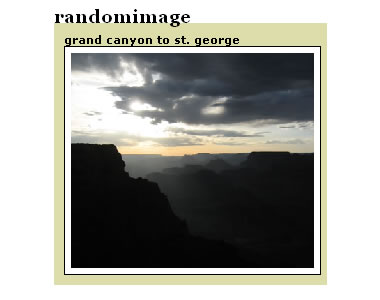
You can see it in action in the upper-righthand corner of my homepage. Here’s a screenshot:
What doesn’t this plugin do?
This plugin does not rotate randomly through a group of images stored in a single directory on your webserver. If you are looking for a plugin to do that, try Matt Mullenweg’s A Rotater Apart or Kamiel Martinet’s WordPress random header plugin or MHough’s Header Image Rotator.
This plugin does not natively resize images (you can use the CSS on the optional image attribute parameter to resize the image in the browser). Which means it does not create thumbnails, create square thumbnail images, nor have any knowledge of how or where your WordPress-generated thumbnail images are stored. It simply looks for a random image that you’ve embedded in the content of your post (or gallery) and returns it. This ensures that it always correctly returns an image that actually exists.
Instructions
- Download and unzip randomimage-5.0.zip (v5.0)
- Upload the file randomimage.php to your plugins directory:
/path/to/wordpress/wp-content/plugins - Activate the plugin (don’t forget!)
- Edit the theme template file index.php or sidebar.php in your theme’s directory:
/path/to/wordpress/wp-content/themes/name-of-theme - Add the following line of code where you want a random image to appear:
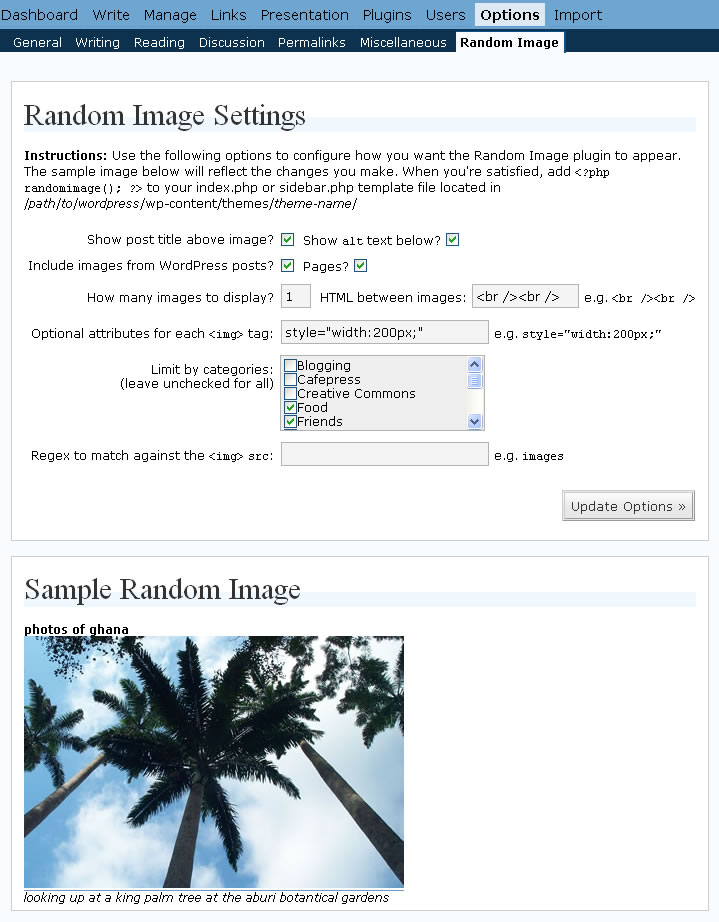
<?php randomimage(); ?> - Configure the plugin from within WordPress under Options > Random Image
How to Include Random Images across Blogs
People have often asked, “How do I include a random image in my main blog from my other WordPress blog?” Actually it turns out to be very easy.
- First, randomimage.php must be installed as described above
- Download and unzip randomimage-standalone-1.0.zip (v1.0)
- Upload the file randomimage-standalone.php to your plugins directory (alongside randomimage.php):
/path/to/wordpress/wp-content/plugins
Note: This is not a separate plugin, it’s simply a supporting file for randomimage.php, therefore there is nothing you need to activate or configure. - On the other blog (or any website, really) where you want the random image to appear, insert the following HTML snippet, replacing
example.com/wordpresswith the domain name (and directory, if any) where randomimage-standalone.php lives<script type="text/javascript" src="http://example.com/wordpress/wp-content/plugins/randomimage-standalone.php"></script>
Note: for the random image to be appear, JavaScript much be enabled in the browser.
Options
The randomimage function can take 12 optional parameters in between the parentheses. If you specify any parameters this way, all settings made through the configuration interface (shown above) will be ignored. Note: this behavior could be useful if you wanted to have several different random images each with different settings appearing throughout your site.
<?php randomimage(show_post_title,
                  number_of_images,
                  image_attributes,
                  show_alt_caption,
                  image_src_regex,
                  post_type,
                  inter_post_html,
                  category_filter,
                  sort_images_randomly,
                  image_class_match,
                  image_template_html,
                  show_images_in_galleries); ?>
- show_post_title is a boolean (true or false) that determines whether the title of the original blog post is printed above the image. The default is true.
- number_of_images is an integer that determines how many random images the function should return. The default is 1.
- image_attributes is a string that gets inserted in the
imgtag which you can use to set attributes like a standard width or a title (tooltip). The default is an empty string. For example,"width='200'"would reduce the size of the image to be 200 pixels wide (and proportionally high). - show_alt_caption is a boolean (true or false) that determines whether the
altattribute (if there is one) is printed below the image. The default is true. (new in v1.2) - image_src_regex is a string containing a regular expression (without slashes) that matches against the image
srcattribute. For example, if you only wanted to display jpg’s and png’s, you would use"(\.jpg|\.jpeg|\.png)". If you only wanted to display images from a specific directory called images, you could use"images". This parameter uses the preg_match php function in case-insensitive mode. For more information on constructing regular expressions, check out regular-expressions.info. (new in v1.2) - post_type is a string that allows the following three values:
postsfor including images from post content only,pagesfor including images from page content only, andbothfor including images from posts and pages. The default ispostsonly. (new in v1.3) - inter_post_html is a string (presumably HTML) that is outputted between subsequent images if
number_of_imagesis greater than 1. The default is<br /><br />. (new in v1.4) - category_filter is a comma-separated value string of numerical category IDs that will limit the plugin to grabbing images from posts assigned to only those categories. The category IDs can be determined by going to Manage > Categories. The default is an empty string which will allow images from posts assigned to any category. (new in v2.1) Even though the name hasn’t changed, this option now includes tags too! (new in v4.1)
- sort_images_randomly is a boolean (true or false) that determines whether the image (or images) pulled from the database are displayed randomly or in reverse chronological order. By setting this option to false, the plugin effectively displays recent images, rather than random images. The default is true. (new in v3.0)
- image_class_match is a string that you can use to specify a classname that the randomly chosen image’s class attribute must contain. So if you set it to
randomimage, only images withclass="randomimage"(or evenclass="left randomimage") will be displayed. (new in v4.0) - image_template_html is a string that acts as a template for displaying the image. With it you can create wrapper HTML around the image, or position the caption on top, or a myriad other things this plugin author hasn’t conceived. Use
%1in the template to represent the title,%2to represent the image,%3to represent the caption, and%4to represent the post excerpt. By default, the template is:<strong>%1</strong><br /> %2<br /> <em>%3</em>
Note: If image_template_html is specified, it overrides show_post_title and show_alt_caption. (new in v4.0)
- show_images_in_galleries is a boolean (true or false) that determines whether the plugin should show images from WordPress 2.5’s new gallery feature. The default is true. (new in v5.0)
If you wanted to use all the options together, you might add the following to your index.php or sidebar.php file:
<?php randomimage(true,
                  1,
                  "width='200'",
                  true,
                  "(\.jpg|\.jpeg|\.png)",
                  "both",
                  "<hr />",
                  "2,5,8",
                  true,
                  "randomimage",
                  "%3<br />%2<br />%1",
                  false); ?>
Development Ideas
- Suppress printing caption if it’s the same as the image filename
- Check image dimensions to prevent enlarging small images (?)
- Add option to only display images within a certain width/height range
- Add a check to make sure image exists
- Optionally create a thumbnail of configurable dimensions (hard)
- Store post image info in the postmeta table (hard)
Questions, comments, and suggestions are always welcome. If you’re interested in contributing to the code behind the Random Image plugin, it’s hosted on GitHub.
This has got me thinking… One of the coolest features of WordPress is that arbitrary key/value pairs can be assigned to posts. Now, the plugin has to run a regex against the content of every post in the database — what if there was a filter action that was triggered at post-time to pull out images and put them into the post metadata table? That would move the processing to the posting stage, but make it easier to get an image when the plugin is called. Or it could just make the whole thing needlessly complicated.
You are so cool.
Hmm, Jackson, I like your thinking about extracting the image metadata when the post is saved, but I’m wary of storing that in a custom table. I guess I could have it store img=>src pairs as post metadata, but I’m also grabbing the alt attribute with my regexes. I’m curious about how the podcasting plugins work for WP, I’ll have to take a peek tomorrow.
I hadn’t considered the alt tag… You could store the whole thing (src, tag, title, etc) as a delimited string (WordPress does this for the Magpie cache), but that adds more processing steps.
Jackson, is there a standard way of triggering a plugin to run when a post is saved?
This is kind of a slippery slope, because I can imagine trying to store the whole post as some sort of DOM tree (cause you never know what kind of plugin I’m gonna think up next).
I wonder if catalogers ever have this kind of internal conflict, given that they know the power and limitations of both searching against metadata and or search against full text.
I think there’s a hook to get your plugin to run when a post is saved, but couldn’t tell you what is off the top of my head.
I know exactly what you mean about the slippery slope. I started going nuts with all the metadata I was tracking for my reviews and had to reign myself in.
Yep, immediately after you left the comment, I rewrote the script to store the image src and alt as post metadata, but I ran into some stumbling blocks getting it to “index” all the posts the first time it runs—and I haven’t had a chance to get back to it.
The code to do so is pretty simple:
add_action('publish_post', 'randomimage_extract_images');where
randomimage_extract_imagesis a function that does the parsing work everytime the post is updated.also forgot to mention here, fixed a bug that was preventing pictures other than the first in a post from being displayed.
i ported this to typo.
Help! I installed the code in my site, but it’s displaying both the thumbnails in the sidebar AND the regular sized images which when come up push everything out of the way and bloat the page. What am I doing wrong here?
Nicholas, you need to set the image_attributes parameter so that the image width is constrained to the size of your sidebar:
Thanks a ton! It works now. Great code indeed :D
hey, I was thinking. Is there any way to make it load swf files? I wanted to add both a random image box and a random video box to my page. I tried changing the jpg tags to swf, but that didn’t work. I know the img tags are important, but I’m not sure what to do here.
My code is specific to image tags, and would need to be rewritten or significantly revised to search for swf or other video files and appropriately display/resize them. It’s not a modification I’m planning to make, but anyone who wants to take my code and extend it or use it as a starting point for something else is welcome.
Hi I was wodneirng how I would get your random image plug in to re-size my images so it can fit into my sidebar, I was looking through the comments and found that other justin posted this: , would I add something similiar to that to my sidebar template with the added line of code for the plugin? Sorry but Im such a noob with all this…
^^^^ Please nevermind me, I went ahead and tried it and it works beautifuly thanks guys!
Justin, glad to hear everything worked out.
Hey is there a way to disallow .gifs or have your script only take form a certain directory? I’d like all the images in my /images to show up as random, but not my .gifs in my /moods folder. Thanks for the help!
Justin, ask and ye shall receive. I just updated the randomimage plugin to do what you requested and a little more. With v1.2, you can include a regular expression that will only display images that match the conditions you set.
In order to accomplish what you’re asking for you’d probably want to do something like:
In other words it will only display images that have “images” in the
srcattribute, which sounds like it would exclude any images in the “moods” folder. Hope this helps!Updated, everything is working perfectly, thanks again.
Props from Brian:
Great plugins. I try to create before, but i can’t. And i found here. Good job. Thanks for you. I use this plugin on my site.
Hey man this is great stuff. We are using it on our little site and its most helpful. I was wondering though. How do i prevent random image from incorporating a link to the originating post?
I set up a passworded page as an image bank and would like to just pull images from there.
Is this possible? I may be overlooking the obvious.. not sure.
Dusty, there isn’t an option to remove the link back to the originating post, partly because that’s the whole goal of the plugin, to create a link back to some existing content.
However… If you are comfortable modifying the source, you can replace line 131 (in v1.2) of the plugin:
with this line of code:
then you’ll get just an image, sans link.
Your question about a password protected page I didn’t quite understand. But it does beg the question whether the plugin should avoid password protected posts altogether, given that it could publicly expose private content. Which would be bad. Hmm.
thanks man. I really really appreciate it!
No problem. By the way, like I said your questions got me thinking about password protected posts, which I’ve just removed from the equation.
I’ve also added an option to determine whether images are drawn from posts, pages, or both. Enjoy, keep the comments comin’.
Hi Justin :)
I am on the lookout for a random image plugin for wordpress. However I am looking for a script that takes random images as part of the header and displays them onload. I was wondering if your script can just take the images out of special folder instead of searching through the news images.
Tascha, the random image plugin displays images that you’ve already included in your posts (using an
<img>tag), and builds a link around the random image it selects linking back to that post. It does not display random images that exist in a specific folder, though that’s an interesting idea—functionally different enough I think to require a different plugin. If this is something you’d like me to work on, leave a comment or send me an email.So if you’ve already created posts displaying the images that you want to show up in your header, and they all live in a specific folder, let’s call it “special” then you could put something like this in your header.php template file:
<?php randomimage(false, 1, "", false, "special"); ?>Hi Justin, your plugin works great! only that when i put it in my blog, the image comes with a purple border (like those of an image link) and i dont know where to get rid of that in my css… im a complete dummy, could u show me which part governs image link borders? like in your blog, the white borders of pics look great.
Eric, to remove the borders around images add the following to your CSS file:
a img { border: none; }Is there anyway to make the images line up horizontally rather than vertically when you have more than one image showing?
and also, is there anyway to stop duplicate images when you are showing more than one image?
Louise, great questions.
Actually no, you can’t currently display the images horizontally because the plugin adds a line break between each successive image. Also the post title and image caption add line breaks.
One possible workaround: If you set
show_post_titleandshow_alt_captionto false and then comment out line 173 of v1.3:by adding two slashes to the beginning of the line, I believe you should be able to display images horizontally. Of course it probably should be easier to do this—with a configurable header and footer around each image.
You’ll probably also want to set an image_attribute like
"height='200'"so they all have a common height.Regarding duplicate images, if the image is included twice in a post or in more than one post (a scenario I hadn’t accounted for) then you’re right, there’s a chance duplicate images will show up. This is a bug. I’ll fix it when I get a chance.
Louise, I’ve updated the plugin to solve both of the issues you brought up.
First of all, it should no longer display duplicate images. Thanks for noticing that bug.
You can also now configure a new
inter_post_htmlparameter to control what gets outputted between images. If you set this to be an empty string ("") and you setshow_post_titleandshow_alt_captionto false, multiple images will be displayed horizontally.Putting everything together, you’d probably want to insert something like this into your template:
[…] I added Justinsomnia’s Random Image plugin today, which is amusing me greatly. […]
I love this plugin! I love this plugin! I love this plugin! I love this plugin!
Sory, I try to use a directory to print random images but I get nothing
My wordpress is à the root
home/procom/domains/licencepro-communication.com/public_html/
and I want to use picture in “images”
Interesting usage: Berlin Real Estate Investments appears to be using the Random Image Plugin to select header image graphics from a contact us page.
Hi Justin, great plugin, but I have a little question, if possible…
I have a photoblog in another directory on my site ( 2 wordpress installations ) and I wish that on my primary blog where your plugin is installed that the random image is linked to the same image of my photoblog.
Is possible to realize this ?
2 wordpress = 2 databases !!!
please drop me a line about this. btw great work.
Great work !!! I love this plug !!
djmitch, I was hoping there’d be an easy way to do this, possibly by replacing
global $wpdb;with a phpinclude()to your other WP install’s wp-config.php file, but this didn’t seem to work for me.Furthermore, I rely on the
get_permalink()function for generating a posts permalink which would be specific to the blog you add the plugin to. This code would need to be rewritten or replicated.So in the absense of my knowing how to instantiate another WordPress install from within WordPress, it seems like you’d have to hack on the plugin a fair bit to get it to work—but it should be possible.
Hi Justin,
infinite thanks for your fast and detailed answer.
Really appreciate.
I will try something, and will back here to inform you if I will realize my wishes….
thank you again mate…
Dear Justin,
I currently need a WP plugin that is able to show random images in my front page. Yours is not quite what I’m looking for, however, it gives me an idea to create a new plugin with similar ability.
Is it okay for me to use your code as an inspiration? As usual, I’ll put your name on the new plugin. How about it? Thanks before.
Matt, go right ahead, the code is released under a GPL license. And feel free to come back and add a link to your random image plugin if you release it as such.
Hi Justin, just a clarification: if one chooses the ‘only images from a specified directory’, is the parameter: “images”, and where is the ‘images’ directory, in wp-content? Thanks for advice
Martin, the
image_src_regexparameter matches against whatever the src attribute of your image tags contain.As far as where you upload your images to, I’m not sure. You can tell by looking at the src attribute of your image tags.
Do you use the integrated WordPress image uploader? If so, you probably don’t need to bother with that parameter, you can just leave it as an empty string.
This parameter is more useful if you have some images in an icons directory, and some in a photos directory, but you only want the random image plugin to look at the photos, so the parameter would be “photos”.
Am interested in associating a specific URL with each random image. The idea is to create an easy random advertisement generator for local advertisers. I assume this would require registering the image with WordPress (like the Random Header plugin does) and an admin interface. Any idea if this is on the burner? Or if there’s another plugin that would do the job? Thanks. This looks pretty cool as is and I’ll probably use it for my personal blog’s sidebar. Thanks for sharing.
Is there a way of specifying that images come from only one category?
Hi, is there anyway for the script get the random pics from a specified location /directory ?
Thanks in advance, great plugin by the way.
[]
Sergio, nope my plugin is intended to grab a random image that already exists in one of your posts and then create a link back to that post. Perhaps Matt Mullenweg’s A Rotator Apart is more what you’re looking for.
You thought about turning this into a Widget?
You mean WordPress Widgets? Nope hadn’t thought of it till you brought it up. Should I? Are you using a Widget-compatible theme?
Yes you should, and yes I am!
I tried to do it myself but broke my site until I deleted my little widget attempt! *blush*)
I am runing WP2.01, and would love to use your plugin, but I am running into an odd problem. In the config interface, and random image appears, but on the blog, the same image appears over and over again.
Also, it only appears in FF. It doesn’t appear at all in IE or Opera.
oops..I figured out the only apears in FF thing..it is only appearing for users that are logged in. Is there a way to change that?
Okay…I panicked. I can admit that.
I figured out the problem. I am running wp-cache, and believe it or not, it was caching.
I still can’t figure out how to exclude the sidebar, but I am sure that I will soon.
Sorry for the multi-posts, but I guess it is good info in the long run!
MilitantPlatypus, it appears to be working on my end, at least reloading your homepage brings up a new image in the upper-right hand corner each time. Feel free to post again with whatever you figured out to get this to work.
Hi Justin,
I’ve modified your plugin so it will get images not from the posts but from a certain folder on the server that will link back to the original image. The problem is that I had just registered my new domain so it won’t be available until next thursday or friday. But if you would like to see it in action please check out this website that I redesigned: http://www.clgi.or.id/aceh/
Hi Justin,
This looks like it might be the plugin of my dreams. I want to have a random collection of book covers in my sidebar which link to archived posts about that book. So far so good. My question: is it possible to either a) set this up so that the images don’t need to be in the actual posts but can be stored elsewhere, or b) have the images in the post as you intended, but limit the selection to just one category?
I’ll go back to sl-ooo-wly rereading your instructions now ;)
Laura
Widget! Widget! Widget! *hehe*
Hi Justin,
Great feature. How to modify code so it will get images not from the posts but from a certain folder on the server that will link back to the original image.
Taru, the whole point of this plugin is to display a random image from one of your posts with a link back to that post.
If you want to display a random image from specific folder, I’d Google around for a plugin that does that. One example is Matt Mullenweg’s A Rotater Apart or Kamiel Martinet’s WordPress random header plugin.
Catherine and Laura, I’ve updated the plugin (now v2.1) so that you can now display random images from posts associated with specific categories.
Jason, I also added better instructions to the configuration interface (which I think is what you were asking for).
Hi,
I was wondering how to get a border around the random image in my sidebar. I hope someone here can help me :)
koen, set the optional attributes setting to something like:
style="border:1px solid black;"Works, thanks a lot :). Great plugin!
This is a fantastic plug-in and I’m using it in two different spots on my homepage, linking to two different categories. I’d like to use it to pull random images from just one page. Is that possible? I tried putting “pages” instead of “posts” with the page ID where category ID goes, but it didn’t work.
In any case, thanks so much for a very nifty plug-in.
Can i use this plugins for my 2.0.3 wordpress?
rionya, yes it should work in WordPress 2.0.3. Let me know if you have any problems.
i use custom field plugins. i add “images” field. Can i still use this plugins ?
sory, late. the content of “images” field is like: http://www.example.com/pic.jpg
rionya, this plugin only looks for image URLs in the content of your post, it does not look for image URLs in custom fields.
However, it would be fairly trivial to modify the plugin to do so (in fact it would simplify the plugin greatly as much of the code concerns parsing the post content for the image src and alt attributes).
Let me know if this is something you’d be interested in having done.
so, anybody can help me ??
rionya, I just offered to help you. If you’d like to chat more, feel free to send me an email.
This is amazing, do you have any tips for how to display this on a website rather than a wordpress blog?
Jaree, I don’t see why not. This particular plugin is designed for WordPress in particular, but the concepts contained within (searching through a database for content containing images, extracting the image src attributes, generating an image tag that links back to the source content) are all easily replicable in another content management context.
Very cool and so easy to implement. Love this idea. Thanks a lot! Unlike so many other plug-ins I’ve tried, I really did just activate it and it worked. Very slick. Good job.
Brock, thanks leaving a comment, glad you found it easy to use. Great use of the plugin in your header.
Wow, this is *precisely* what my daughter described she wanted in her blog I created, except she wanted the last [n] recent photos (a different purpose than yours). Do you happen to know a snippet to replace your random with recent? I’m thrilled to find this, thanks!
echo, done. I updated the plugin to v3.0 and added a configuration option that allows you to turn off the random image order to effectively display the “n” most recent images with links back to the posts they came from. Let me know if this works.
Wow, Justin, you rock!
I’ll report back with a link after upgrading. It’s going to look (+ work) fabulously!
As an aside, I’m wondering why on your site, you don’t seem to specify the column’s width on your images, so their height is proportionately scaled, as I understood your instructions to mean.
echo, on my site, I use the “optional attributes” field to set
id="random-image"on the image (since I only ever display one random image).Then in my site’s stylesheet I restrict the width (and the height proportionally, by default) using the following CSS:
#random-image {
    width: 167px;
}
If you actually look at my CSS, you’ll see that I jump through a few more hoops to allow the image to scale down when the page’s width shrinks in browsers that support
max-width(e.g. Firefox, Opera, etc). But the end result is the same. For most people I wager, setting the width on the image itself is a far more accessible technique.Oh, I see in FF it’s working as intended, but what I was reporting is unfortunately Safari is displaying the images original height, so it’s not proportional, yuck! I hope there’s a solution, I’d be glad to test in Safari if you don’t have access to a Mac.
Ah yes, for some reason this is a place where Safari differs from both Firefox and IE. I’m not sure why. Unfortunately I don’t have a Mac to test on nearby, but I’d suggest a few strategies:
* try a percentage or em width
* try a setting a max-width
great plugin, thanks!
Nice plugin !
Just what I was looking for.
Had to add,
a:link img,
a:visited img,
a:active img {
    border-color: #a29844;
}

a:hover img {
    border-color: #ffffff;
}
to my stylesheet to change the color of the ugly blue border around the image in Internet Explorer 6.
Hey thanks for the plugin.
Will try and let u know if i have any problem.
Hope you help.
Hey isn’t there any perfectsize for the image?
Like if in the post i place 300 x 300 image, can that be resized to 100 x 100 image in the random images section.
I got it.
Thanks for the plugin once again.
Check it in my site and tell me whether it is correct or not.
hi, nice work but i have problem with the lang.
some characters like i, ş, ü, ç, etc. are shown like that sayısı
what do u offer for it ?
I’m faced with following error when I activate the plugin :( what should I Do?
Paing, that error is indeed strange. Could you have possibly modified the source of the plugin, (maybe by accident)? Was the error any longer that what you included above?
You could help debug the problem by replacing line 368 of randomimage.php:
with this:
Then reactivate the plugin, copy the full contents of the error message you see, and paste it into a comment here. Thanks!
Hi Justin, would it be as simple as going through the plugin file and changing the word randomimage to randomimage2 then saving the file as randomimage2.php if I wanted to impliment another seperate random image plugin on the same WP site?
BTW great plugin!
Tom, if you want to use the random image plugin twice on the same site but with different configurations, you shouldn’t need to make a copy of the plugin unless you intend to modify the source code.
Instead you can use function parameters to customize the output (described under Options at the bottom) for each instance that a random image is displayed which will override the defaults in the configuration interface.
Thanks. Renaming the word randomimage to randomimage2 works great. I can then control the options via the admin. Which is handy if I decide to us this plugin for a client. Thanks again.
I’ve bookmarked your site in my to paypal section if I ever make any money :)
Tom, good point. Glad that solution worked out for you.
Hi, Good Morning. Is there any way to have a Random image in a page or post??
Sorted it with runPHP :)
Tom, I hadn’t tried embedding a random image inside a post/page before so I’m glad to hear runphp made it possible. Feel free to include a link to the site you’re working on when it all comes out.
Best. Plugin. Ever.
Thanks so much for this, it works great and I love it. I sit there refreshing for 10+ minutes at a time, just to see what will come up next. It’s a terrific way to encourage readers into your blog’s archive. Great work!
Burbanked, wow, geez, thanks for the praise.
[…] I searched for a plugin that would help me do the job. The first one I found was the Random Image Plugin. This plugin randomly selects an image attached to a post using WordPress’s built-in upload feature and displays that image. This is not what I wanted to do. […]
Hi, thanks for this amazing plugin, exactly what I needed!
My only problem now after installing it, is that the jpgs in my posts are pretty large. On my front page I want to appear 6 small random jpgs. They now take some time to load. I was wondering: WordPress automatically uploads thumbnails for each image. What would be neat is if I could make your plugin pick the thumbnails instead of the actual jpgs. The thumbnails are systematically named as: name.thumbnail.jpg
My php skills are not enough to change your plugin, to add the .thumbnail between the pictures name and the extension. Could you help?
thanks!
Remco, sure no problem. Just open v3.0 of randomimage.php in a text editor, scroll down to line 431, right below this line:
and paste this line of code:
$image_src = preg_replace("/(jpg|jpeg|gif|png)$/i", "thumbnail.$1", $image_src);That will take the src url for every image that ends with jpg, jpeg, gif, or png and replace it with thumbnail.jpg, thumbnail.jpeg, etc. Be aware that this plugin is nondiscriminating—it doesn’t check to make sure the thumbnail image actually exists. If it doesn’t, you’ll get a broken image.
Hi Justin, Thanks a lot for your fast help! I added the code and it works perfectly. This is why I love wordpress, a lot of nice people around willing to help out. Thanks again.
lozbrown, cheeky suggestions are always welcome, I’ll see what I can do. I’m not sure what you mean by “attachment page” though. Can you give me an example URL?
As far as arranging the images in a grid, the only way to do this cleanly (as the plugin is currently written) is by floating the images to the left and ensuring that they all have a constant height. You’ll also need to set the inter_post_html attribute to an empty string to prevent the default behavior of double newlines (
<br /><br />) from showing up between the images:If you want the images to show up in a table with a set number if images per row, then we’ll have to do some plugin hacking.
Btw, the pictures on your site are unbelievable. I’ve done a little seakayaking, but nothing like that.
Hiya, I really like your plugin and will be using it on the site under the sidebar as soon as i get chance to edit the file so it displays the thumbnails instead.
However I suddenly realised it could be usefull for one of my other projects. I am trying to create a gallery of all the photos uploaded by the authors on the site
Heres what ive got so far:
http://www.teampyranha.com/gallery2.php
Questions:
1 if i call random image multiple times will it cycle through the images without reapeating them.
2 if i call random image more times that there are photos what will happen? if there is a problem is there any way to prevent it?
lozbrown, if you set the number of images attribute to some large number, e.g.
…the script will just run until it exhausts all possible posts that have images, and it should never show a duplicate (based on the src attribute).
I didn’t realize WordPress had started automatically creating image thumbnails. I’ll look into adding a configuration option to grab thumbnails only so folks don’t have to hack the plugin source as I suggested to remco above.
Firstly Thanks for your speedy and Really helpful reply!
Can you suggest any way to arrange them in a grid?
To be really cheeky I’m going to suggest some more usefull configuration options, such as:
Drop down box labeled: link images to
with options:
-attachment page
-originating post
-author
I’m sure you can work out what each of those is supposed to do.
Another usefull option if possible would be to be able to have random images only from the current author , this would be enable you to put a few random images by each author on there author page.
But then there all probably very specific features that probable only I would be intrested in.
Hiya
Firstly attachment.php is part of some themes and looks something like this http://www.teampyranha.com/?attachment_id=115
It chooses which photo to display simply by the url encoding, I think the 115 in this example relates to id of the dummy post that stores the info about the attachment.
Oviously it would link to the page relevant to the photo you have clicked on.
The gallery may require a different plugin based on similar code. I will have a look into it but my expertease with this kind of stuff is small to none.
With reguards the photos unfortunatly none of them are mine, I’m not that good I just run the site, the guys who post on it are an elite bunch who are sponsored by one of the worlds biggest canoe kayak manufacturers.
Btw:
I tried using the random image thing with an arbitary large number with the following results:
http://www.teampyranha.com/photos/
This some how only gives 15 results rather all.
Also you get a random mix of thumbnails and full size images depending on whats been used in the post.
Also the code you suggested to remco will be problematic due to the fact if the image is already a thumbnail it such as image.thumbnail.jpg it will make it image.thumbnail.thumbnail.jpg which will probably be a broken image.
[…] Eklenti Adı : Random images (Her Açılışta Farklı Resim) İşlevi : Sitede o zamana kadar yazmış olduğunuz yazılardaki resimlerden istediğiniz kadarını, sitenin istediğiniz yerinde rastgele bir şekilde gösterebilmenizi sağlar Örnek : http://www.yakuter.com Kaynak : http://justinsomnia.org/2005/09/random-image-plugin-for-wordpress/ […]
This is a great plugin for a site I am doing for friend. I too wish it was easier to do a grid. Currently just resizing thumbnails… It would be great to crop them (like flickr plugins I’ve seen) so they dont squash.
Thanks again!
oh and the site is here:
http://accuracyandaesthetics.com/
and I am testing different things here:
http://test2.mw2mw.com/
[…] Justinsomnia […]
Thank you for your support, as the plug-in works perfect. I wanted to know how to add a link in the title above the random image? You have the images with a link to the blog published. How do I do the same thing for the Title just above the image?
Sam, this is not something the plugin does natively (maybe it should?) so in order to add that functionality, all you need to do is edit randomimage.php, scrolldown to line 443 (in v3.0), and replace this line:
with:
Using WP2.0.4 when “Sort images randomly” is checked, I get one image from every post. When I uncheck this to show recent images rather than random images I get all the images from a post as opposed to only one. How can I get one image only from each post and have chronological ordering?
http://bekant.org/
Thanks!
and this continues to be the best plugin for portfolio sites ever!
Marek
marek, I’m glad you’re getting such great use out of this plugin. your description of how the plugin worked for recent images (rather than random) was spot-on.
I guess I figured that if someone wanted recent, chronologically ordered images, they probably wanted to see every image, including multiple images in a single post. Maybe not.
Since you’ve asked for it the other way, I’ve updated the plugin in v3.1 to behave as you’ve requested. When a post has multiple images, only one will be chosen at random, regardless of whether the plugin is returning a random or a recent image.
If there’s a groundswell of desire for the previous behavior, I’ll add a configuration option specific to recent images.
hello Justin! nice plug, but here’s my question: you noted that What this plugin does not do is display a random image from a directory on your webserver., hows that supposed to be treated? what if all pictures to all posts are put to the same server where the WP installed? or did you mean anything else by that statement?
iSynth, sorry for the confusion. I rewrote that sentence to read:
Meaning that the plugin will only display images that are already displayed in your blog posts using an
<img/>tag. Thesrclocation of the images can be anywhere, either locally on your webserver, or on any other remote webserver.I hope that makes more sense.
yey, that’s much clearer now cuz i was afraid i’ll have to put pictures up to some a$$ instead of having them handy :)
and yes, that category-bound toggle is a super idea (esp. for me), so let’s the set stone rolling and test it asap! feedback coming up! thanx again!
hello Justin! works fine for me, except for one thing: i cannt seem to find a way around to style the border for the image, like it’s represented say here:
http://www.synthdicate.com/2006/10/19/camouflage-relocated/
ive check the “Optional attributes for each tag:” field but didnt find much. or should i arrange a within sidebar.php with the same class as it used in the page above?
thanx a ton in advance!
and one more bug: rarely it returns nothing, my mean is that for now there are 3 reviews, so 3 jpg files accordingly, i switched the following options for the plug:
Show post title above image? = yes
Show alt text below? = no
Include images from WordPress posts? = yes
Pages? = no
Sort Images Randomly? = yes
How many images to display? = 1
Optional attributes for each <img> tag: = none
Limit by categories: = reviews only
Regex to match against the src: = .jpg
thus if you refresh a page a severel times, you will get the idea and maybe will fix or help fix pluings incorrect behave!
thanx!
me again!
in regards with my prev post, the wild guess is that in the post there is also a GIF image used (stars), so when using Regex function, it just somehow blocks GIF from being displayed, thus it looks like nothings there! right?
iSynth, to style the random images the same as the thumbnail at the top left of the post you linked to, set Optional attributes for each <img> tag: to
class='image2'which is the CSS class your thumbnail images have.I’m not sure why sometimes it doesn’t return an image. I’ve never seen that happen before.
Try setting Regex to match against the <img> src: to nothing.See my next comment for an explanation.iSynth, yes, I think your guess is correct. The plugin grabs every post with an image tag, then randomly picks an image from that post, which might be your stars GIF file. Then it checks the image against the regex, if it fails, it goes to the next post (not another image in the same post), and does the same thing—and since you only have three reviews, it occasionally randomly chooses the stars GIF each time and gets to the end of the possible posts without returning an image. Oops.
Yeah, this is a bug. Or an unintended consequence of my design. I’ll work on a fix.
hello Justin! thanx for the tip, class=’image2′ works now ok.
as the bug issue, since i use this class=’image2′ for the tag where the image is icluded, maybe it would be nuff to add such additional attribute to regex filter, something in the way “pick only images that have .jpg exension and do belong to class=”image2”?
what do you think?
me again. sorry for the long discuss.
anyhow, i thought about image_src_regex field, and this thing dawned at me, since “stars gif image” is under root/images/stars directory, and the review-album-thumbnails are root/images/reviews/001 directory, maybe it makes sense to specific directory, not file format? the only heck is that there will be review thumnails galore, so i tend to creat some more forlders in the way like root/images/reviews/201, root/images/reviews/401 and so on to fill 200 jpgs in each!
if i specify the path like root/images/reviews/ in the regex field, will it still work?
tia!
Okie dokie iSynth, I’ve fixed the bug in the plugin (new version is 3.2) so that now it looks through every image in a post before going to the next post to find one that matches the regex. Once it finds a random image in a post that works, it will look for another random image in another post, depending on how many images you’ve set the plugin to display. Many thanks for helping me track this down.
As far as what regex string you personally choose to use, I would suggest using something like “reviews” since the regex pattern matches against the whole
srcattribute (domain, path, and filename), and since it’s conceivable that “jpg” might be too broad in the future.Justin, no probs! thanx for being so pro, yer work is just brilliant!
using it on full speed!
iSynth, awesome, so great to see that v3.2 fixed things for you. Peace.
from two comments on 10/16-17/06: Sam & Justin: Adding links to the title such as the image. Your code works perfect, Thank you, Justin for your support. ;-)
WoW!!
So easy – peasy. Will the script look for any image in a directory at host in WordPress theme?
Thanks for the random image script Justin – and making it a doddle to do.
Kate
Hey dude, great plugin.
I had an idea to grab an image from another database (same server – another wp database)
I thought maybe I could use your script but i’m not sure where I need to edit things.
Do you think you could help?
send me some mail if you have any idea
– mike at nothing dot net dot nz
Would it be against Google adsense tos to put this next to the adsense ads? IMO it would be but just in case I’m missing something.
Kyle, I’m not sure how this plugin has any bearing on Google’s Adsense.
[…] Eklenti Adı : Random images (Her Açılışta Farklı Resim) İşlevi : Sitede o zamana kadar yazmış olduğunuz yazılardaki resimlerden istediğiniz kadarını, sitenin istediğiniz yerinde rastgele bir şekilde gösterebilmenizi sağlar Kaynak : burasıı […]
Hello ! Really cool plug thanks ;-) Is there a way to set a random time to change the image instead it changes when page is loading ?
fx1, nope, it only selects a random image on page load. But thanks for the idea. It would be possible to store an update interval preference and the last updated time, but that just seems more complex than it’s worth.
how to use this plugin to display images of the next/previous posts?
this would be really nice…
thanks
deko, I’m not sure what you mean. Would you envision there being links below the random image to the next and previous posts (relative to the random image’s post)?
hello,
could this great plugin create the thumbs by itself?
because the thumbs created by wordpress are too big for my taste.
because I would like to use 3 sizes of images (full/thumb in post/smallthumbnail)
I found another plugin that does it, and creates it’s own thumbs, but it has no random feature…
thanks again for this great piece of code
hi justin,
by next/previous images I mean use the thumbnais as navigation between posts in order (the loop) without random.
Justin – fantastic plugin, like everyone says.
I changed line line 432 to be:
So that I have full control over the style of both the title of the random image and the image itself. Thought others might find this useful…
Huh, well that did not escape the code correctly, at any rate, I had it print a div class=’randomimage’ and a close div around the php call for the image title (which I have also changed to be a link).
Thanks a million for the grat work!
[…] My quest evolved into, how to convert a sidebar plugin to a widget, when I found randomimages by justincwatt. Since he included the PHP code to call the plugin, I thought I should be able to handle it. I gave up after a few hours, and after repairing my theme, that I had trashed. […]
I’ve been thinking for a long time that a plugin like this would be good, but I’d really like to be able to use it in a page rather than just the sidebar, and with some navigation to display the next/previous x number of images (with the random option off).
Re the page thing, I upgraded my runPHP plugin and it works now. Now all I need is being able to navigate through the images.
Greg, if you had that ability, what would happen when you clicked a next (or previous) link? Would you go to the post the next picture was on, or would you stay on the current page and the image would just change to the next image?
I assume you mean the latter, which though not impossible, is not easy either in the context of a wordpress page, and sort of outside the scope of this plugin. It sounds like maybe this is the wrong tool for the job.
It sounds like you are trying to create more of a visual archive?
This was working ok until I upgraded to WP 2.1, is there an update on the way?
mike, I justed tested with WP 2.1 and the plugin still works, it just didn’t obey the posts vs. pages configuration option. I’ve updated the plugin (v3.3) so that it now works correctly with v2.0.x and 2.1. Let me know if you have any other problems.
Yet another friend wants to use this plugin on her art site. Its great!
However, I want to have different images display in the footer depending on which category you are looking at (paintings in the ‘paints’ category etc). I can’t seem to get the plugin to work right in conditional tags… this is probably my lack of knowledge. I put examples I tried here:
http://katiemerz.com/wp-content/help.txt
But always get errors… any advice?
Thanks
marek, thanks for the help.txt—that was indeed very helpful! And what a great use of this plugin. I never thought to change the output of the plugin depending on the category, because I’ve only ever used it on the homepage.
The problems you’re likely encountering are PHP syntax errors.
randomimage();is a function in PHP that prints out it’s content, so you don’t need to include quotes or PHP tags (<?php ... ?>) around it when it’s already inside a PHP-block.I also noticed that you were having the plugin limit itself to posts when you probably meant it to use pages (something I’m sure you’d have discovered yourself if you’d gotten past the syntax errors).In any event, here’s the corrected code (I haven’t actually run it, so it may need to be further tweaked):
<?php if (is_home()) { // no random images } elseif (is_category('6')) { randomimage(false, 100, "", false, "", "posts", "", "6", false); } elseif (is_page()) { if (is_page('paints')) { randomimage(false, 100, "", false, "", "posts", "", "6", false); } elseif (is_page('draws')) { randomimage(false, 100, "", false, "", "posts", "", "1", false); } else { // catch-all for other pages randomimage(false, 100, "", false, "", "posts", "", "", false); } } else { randomimage(false, 100, "", false, "", "posts", "", "", false); } ?>Thanks, that worked like a charm!
I am doing a special page before each category, which is why you have the odd idea of the ‘paints’ page showing the content of posts in the ‘paints’ category.
Oh, ok, gotcha, you know what you’re doing. I’ve updated the code sample. Glad to have helped.
The next problem was that, although only the thumbs belonging to a category show up in that category, as soon as you click any thumb, you get that post with all the thumbs from all the categories. So I also had to do another lot of statements:
elseif (is_single())
if (in_category(‘1’)) { randomimage();}
exactly like for pages in your code above. Now it works! Each post only displays thumbs from other posts in the same category.
Thanks!
marek, if you’re only ever assigning 1 category per post, you could probably do something like this to simplify your code:
foreach ((get_the_category()) as $cat) {
  randomimage(false, 100, "", false, "", "posts", "", $cat->cat_ID, false);
  break;
}
but your if-statements might be more readable later. more info at get_the_category.
I’ve just finished Installing ‘RandomImage’.
How wonderful!
but I couldn’t install ver.3.3 because I use WordPress ME ver.2.0.7, so I tried to download RandomImage ver3.2,(I guessed where it is) and It works!
It will good for WP2.0.7user if you rewrite Link to Download “RandomImage ver.3.2”.
Editors note: this is incorrect:
bug in your software
in the instructions on the plugin you say e.g.
style="width:200px;"the 2nd ” (quotation marks) are in the wrong place
it should read
e.g.
style="width:200px";its only a tiny thing, but could mess up a template and to the inexperienced wordpress’er, they might get stumped with this.
great plugin
thanks
SEPguy
Nick, I believe you are incorrect, the semicolon denotes the end of the CSS style rule (it’s not a PHP statement) and thus belongs inside the quotes.
The eventual location of the
image_attributesoption is inside the image tag, where it wouldn’t make sense to have a bare semicolon outside the quotes e.g.:<img src="image.jpg" style="width:200px;" />Hope this makes sense.
Great Plugin, It works like a charm!
One wish – Question:
Can it be made to display images from another WordPress blog? I’d like to be able to display recent or random images from my other blogs.
Please let me know.
Cheers
Lachezar
lachezarpk@gmail.com
[…] … “Catch of the day” at My Visual Diary … I’ve just installed a different Random Photo plugin for WordPress, with which if you click on the thummbnail, it will take you to the original post. Please let me know if it creates any problems or slows down the page. If you like it you can downloaded from: Justinsomnia.org […]
The statement:
style="width:200px;"is correct as it is. If you move the quotation marks it won’t work.Great plugin. It would be even nicer if it can crop image enbeded to the size given using GD library or something.
Hi Justin!
I have a question, how can I edit the plugin to show only the original images and not the thumbnail images?
Pinkbunz, the plugin grabs the image urls to show from the content of your posts, so if your posts have the thumbnails embedded, then that is what the plugin will find. If that’s the case, it might be possible to edit the plugin to strip the “thumbnail” from the url in order to display the original image.
How do I do that? I don’t know how to code in PHP. :(
Well, could you perhaps pass along a URL so I could see what’s going on? That would help and then I’d be happy to offer a solution.
It’s working great in my blog. I think people prefear having an image instead of a text link to older posts. Looks great!
Amazing work ;)
Hi~ Thank you for this.
But I want to ask. I have 2 instances of this on my blog. One is on the front page, the other as a small random pic on the succeeding pages.
Is there a way to have one of those instances not have a link to the original post?
Yuki, not easily. Since in my mind the intent of the plugin is to provide a link to the source of the image, I’ve been hesitant to add an option to turn off that behavior.
In order to accomplish what you describe, you could create a copy of the plugin, edit the file to remove the link from line 452 (v3.3) and rename the plugin and function.
Thank you, Justin.
One more question, where in the code do I change the php function? Sorry, not really good with PHP.
No problem Yuki. On line 273, change
function randomimage(to something like
function randomimage_without_link(and then in your template, you’d reference it as:
<?php randomimage_without_link(); ?>If this doesn’t work just send me an email.
Thanks for the well written post. This plugin wasn’t what I was looking for, and the explanation and pointers helped me get closer to a solution.
Chap, you’re most welcome.
Thank you very much for the help, Justin! Will let you know if it works or problems arise. :)
Kamiel’s random header link doesn’t seem to be there any more, and when I googled, they all point to the same place – which is not there. I want to randomize the header image, any other suggestions?
Byte.dreams, I found the page in the Internet Archive, WordPress random header plugin, and found the file download location here still works. If you can’t get it for whatever reason, send me and email and I’ll send you a copy.
Thanks! I’m a total pea brain and had never heard of wordpress or php until yesterday….but its working great in my blog!
jessa
jessa, there’s a first time for everything. glad to hear the plugin worked for you.
Hi Justin. I tried your suggestion of making a copy of the plugin and simply renaming and editing the functions.
But when I activate it, the whole wp-admin disappears. I cannot access the wp-admin. So I have to delete the plugin to revert.
I think I’m doing something wrong.
hi, congratulations for this great plugin, I’m using it successfully at http://idealist.blinkr.net/
I have a request…
could it show a defined image when there’s no image on the post?
I’m also using a plugin called thumbs-post (that has no random feature) that shows you and image when theres a broken or missing image on a post.
thanks again.
idealist, I like the idea of displaying a default image in the event that the randomly selected image doesn’t exist, but unfortunately that would be difficult to code because it means the script would have to verify the image exists before returning the page to the browser.
Since URLs often point to absolute locations, e.g. http://idealist.blinkr.net/images/myphoto.jpg, even when the image is stored on the same server, I’d have to jump through all sorts of hoops in order to determine where to look for the image.
In the event that the broken image is stored on another server, that’s even harder because I’d have to request the image and wait—which would hold up page loading time. Plus, linking to images on other servers is borderline unethical.
My advice has always been, if you have broken images—fix them :) There are a number of utilities you can run to spider your site and uncover these things, e.g. Xenu’s Link Sleuth.
Since established blogs usually have many images in their archived posts, if I did add some kind of broken image avoidance code, I’d probably want the script to just display another random image.
All this said, if your particular situation is more specific than what I’ve described feel free to reply with more details.
Justin, thanks for the Plugin! It works well, is a snap to use, and gave me exactly what I was looking for. Great!
Great plugin – thank you. One problem, when I put the php call at the top of the sidebar, whatever is supposed to come next disappears, e.g., the Recently Written List or Categories. This forces me to place it at the bottom. I would like to place it at the top.
Robert, I’m not sure why that is, other than possibly an unclosed tag somewhere that is causing the browser to not display some content. Can you reply with a URL of a page that has the random image plugin displayed?
Hey Justin great plug in. I want to have a separate folder with small sized pics that aren’t related to my blog persay. So I was wondering if there is anyway to have it display photos that are not ones I use in my blog and also make the displayed image not clickable.
Is there a way I can cull images from the thumbnails in the wordpress directory? I need to use smaller high resolution images. (The plugin rox, btw.)
Opps. I found a comment that talks about how to do just that. thanks anyway.
Hey Justin, the plugin works great and I’ve been using it for yonks! Thanks you!
But for the first time I’ve ran into a problem, but not a proper problem. How can I exclude .gifs from being shown? I’ve got some posts that sell items via Paypal and the paypal 1 pixel gif gets shown as a random images. Any ideas on a way around this? Can I made random images defined as the first image in a post? Or give all the images I want to show randomly a special ID tag or vice-versa?
Thanks,
-Darren
Would adding this to line 385 of the plugin work
WHERE post_content LIKE '%Then just add random as an ID for the images I want to show?
I got it working! :)
I just need to add this between the % on line 385
img id=\”random\”
Now every image I want included in the random rotation, I just need to add id=”random” straight after the img. Thanks!
Darren, you could also enter
\.jpg|\.pngas the “Regex to match against the <img> src” to make sure .gifs were not selected. But it looks like you’ve come up with another solution.Thanks Justin, I’ll keep that in mind for other sites, but having an ID I can add to images works great. Since I’m using the plugin to highlight a random product in an online shop :) I can select the ones I want to promote.
Darren, I like your solution too, it’s one that I’ve suggested another plugin developer add (to a different plugin). I would recommend using a
class="random"attribute rather thanid="random"because ids should be unique on a page. I’ll think about building support for that into the next version.Seems like there could be two scenarios, show only pictures with
class="random"or show all pictures except those withclass="not-random".Thanks for that!
I only went with ID because I’m only using it for one random image :)
If you have a spare minute how would I impliment the ‘Regex to match’ option out of interest?
Hmmm… is there a reason why the paypal images are picked up? When “image” src is used instead of img scr in the PP code.
My brain will kick in at some point ;)
I’ve switched it to class on my copy of the plug as when I’m viewing the archive I get multiable duplicates of the same ID.
Nope got it! Sorry I tend to type faster than I think, thanks again, Darren :)
I gave an example of using the regex to select on jpgs and pngs:
\.jpg|\.png(thus avoiding .gifs). It looks like you figured out the class vs. id attribute issue. I’m not sure what you meant by “When “image” src is used instead of img scr”. Feel free to respond if you have any other questions.input type="image" src= http://example.com/images/add_to.gif" border="0" name="submit" alt="Make payments with PayPal - it's fast, free and secure!This is the snip of code that holds the information for the paypal gif that gets picked up by the plugin, it similar code for Amazon referals too. Do you see what I mean?
“image” instead of img.
Bug#er. Sorry my mistake.
img alt="" border="0" src="https://www.paypal.com/en_GB/i/scr/pixel.gif" width="1" height="1"This one’s the 1 pixel gif. :(
I keep modifiy your plugin, but I’m keeping notes in the code. I’ll email you a copy in a week or so. You might find some useful mods ;) Do you have a point of contact email URL?
A quick solution that comes to mind would be to set the regex to
http:, requiring that all random image src’s include http:, thus ruling out the https: paypal url. Of course that only works if all your image src’s begin with http:I am working on my cycling club website. Your plugin works perfectly. When i activate Random Image i got a small problem in EC3 Calendar plugin.
The author say this about the problem: another plug-in is grabbing the window.onload event. Contact that plug-in’s author and ask them to fix the problem (He suggest looking at: http://blog.firetree.net/2005/07/17/javascript-onload/ ).
It seem just a way to do things for helping WordPress plugin writer a better interaction and for us WordPress plugin user a problem free life!!!!
Thanks for your work!
Guy, I don’t think Random Image was the culprit. It doesn’t use JavaScript or access the onload event.
Hi Justin, I want to call one image from each post in a certain category (in nor particluar order). Is this possible with your plugin?
Chris, yes you can limit the plugin to pull a random image from one or more categories.
I’ve installed this plugin at criticalbloggers.org For some reason all the pictures are linking to the last post of the ‘recently posts’ list, instead of actually linking to the post itself. any idea why that might be?
thanks.
max, I’ve never seen that behavior before.
I imagine it has something to do with the fact that your posts link to external blogs’ posts instead of to your own posts—which is really the intent of the plugin. I can only guess that the
get_permalink()function that this plugin uses to return the URL of the post is somehow being thrown off by this.I’m curious, how have you configured WordPress to link externally like that?
on the site we’re using the feedwordpress plugin since the goal was to set up a syndication site. I suppose I should just turn off the links for the random image plugin?
Grat work
i was searching for that since yesterday
thank you very much
Love, love, love your plugin! it’s installed at http://www.livinginzen.net. I donated to show my appreciation. Nice work, Justin!
Hi there.
Ive installed this on my blog, but when i add the code to my index.php page it gives me an error:
SELECT wp_posts.ID, wp_posts.post_title, wp_posts.post_content FROM wp_posts WHERE post_content LIKE ‘%
Why???
Thanks
Deus, what version of WordPress are you using? Could it be for some reason that your posts table isn’t wp_posts?
Also because the error message includes a “<” everything after that got cut off in your comment. Perhaps you could email me the full error message?
Hi Justin- I don’t think you understood my last question… please read carefully: I want to call one image from each and every post in a particular category (in nor particluar order). Is this possible with your plugin?
Chris, yes this is possible, just set the number of images to display to some large number (e.g. 1000000) and choose the category you want to pull from.
hi Justin.. but the problem is that most of my posts have more than one image in them- and I only want to limit it to display ONE from EACH post
Chris, yes, this plugin will only return one image per post.
So for example if your blog has 5 posts, and each post has 5 images, and you set the number of images to display to some large number like 1000000, the plugin will only return 5 images (one randomly chosen from each post) and not all 25.
Hope this clarifies things.
yo Justin- it would be really useful for formatting if we could ad ‘before image html’ and ‘after image html’ parameters, too!
Hi, great plugin. I would like to ask how could I do put it shows only thumbnails from recent posts? Because it only shows smaller picture but in original big size and it makes bigger page size for loading. Each my article begin with a thumbnail so its possible show only this thumbnail and no another pictures in the article? Visit my homepage site and you can see it. Thanks.
Chris, good idea. I’ll add to my list.
Roman, there are a number of options. You could set the regex to include something like “thumb”, assuming the thumbnail images actually show up in your posts and their URLs all have “thumb” in it. Or you could edit the source of the plugin to automatically prepend the image URLs it finds with a “thumbs/” subdir—but then you’d have to make sure that a thumbnail exists for every one of the images in your post.
Justin, could you modify it for me and send me on email? thanks.
Roman, I gave you several suggestions each with possible complications depending on details about your particular set up that I can’t discern just by looking at it. Did any of them work or make sense?
If you are interesting in having me code for you, I’m going to need more information, or a donation, or both.
unfortunately, there are thumbnails for each category in different folders. is possible definr put the plugin shows only pictures with size width 60px from all pictures folders?
Roman, the plugin doesn’t do any processing on the photo file itself because that photo could exist anywhere (or your server or on another), and fetching the file on every page request would have detrimental effects on the server.
So the only way I could see limiting the returned images by size would be based on the
width="60"orheight="60"attributes, and looking at the source of your site presently, it doesn’t look like your image tags includes those.I am not sure how I can modify that :/
In the siderbar I’ve inserted code of randomimage but If I insert this code the randomigage have a problem:
$db_host = xxxxxxxxxxx;
$db_user = xxxxxxxxxxxxxxxx;
$db_password = xxxxxxxxxxxxxxxxxxxx;
$db_database = xxxxxxxxxxxxxxxxxxxx;
$xxx = mysql_connect($db_host,$db_user,$db_password);
mysql_select_db($db_database,$xxx);
Can I solve the problem?
thanks
dam, the randomimage plugin is encapsulated inside of a function and uses the
$wpdbdatabase object, so there shouldn’t be any interference with other global namespace variables or database connections.Hey Justin, I have been using this awesome plugin for a while and all of a sudden my site went down and when I was deactivating one by one, it was this random images prlugin that was causing the problem… After it stopped working I upgraded to 2.2 to see if that was the problem, but still it wont work :-( any idea what’s up?? thx in advance!
Evan, strange. I haven’t tested the plugin with WP 2.2 yet, so I imagine that could be a problem, but it’s strange that you think the plugin caused your site to stop working out of the blue before you upgraded.
Can you describe what you mean by stop working? Were there any error messages? I think I might need to add an option to this plugin called “debug mode” to help diagnose these types of problems.
Also, have you upgraded to the latest version of this plugin (3.3)?
Hey Justin,
Thanks for your reply. Yeah I have the latest version at 3.3 and I have the problem with both wordpress 2.1.3 and 2.2.
What I mean by stopped working is that the page wouldn’t load. The connection would just timeout and I would just be left with a blank page. I deactivated plugins one by one and when I deactivated yours my site worked again…
Evan, I just did a clean install of WP 2.2 and imported 4300+ posts from my blog which contain image tags pointing to 1000 images. I installed the Random Image Plugin v3.3, put it in my sidebar, and the blog loaded, with no noticeable problems.
So…something else must be going on. What settings did you use for the plugin? Perhaps you accidentally set the number of images to display to some very large number? Or perhaps the regex is causing the plugin to loop through many posts unsuccessfully?
To test these theories, I updated the plugin (v3.3.1) with some optional debugging output. All you need to do is download and activate this latest version, and change line 289 to read:
$debugging = true;If you could copy that output and paste it into an email to me, that would be great.
Btw, you said the plugin caused your site not to load. Were you also unable to access randomimage’s configuration interface?
dam, I made a minor change in v3.3.1 that may fix the problem you described a few days ago. Let me know it this works. Thanks.
Hi Justin, your plugin rocks, thanks for answering my previous questions. Check out how I’m using your plugin for my graphics portfolio on my site.
How hard would it be to add a ‘before image html’ and ‘after image html’?
Chris, actually I’m working on it right now. Should have a new version ready to go, maybe tonight?
To Chris and all others who’ve asked for it, you can now customize the output of the randomimage plugin using a template! You can also have it only choose images that contain a specific class attribute. Enjoy.
Hello and THANK YOU for this great plugin ! It looks great on my homepage, but no matter how much i’ve tried, i am not able to change code so that the titles would be shortened (to only use just one line, not two or more). I’ve tried by changing this line:
$image_html = str_replace("%1", substr($post_title, 0, 23), $image_html);It works… but it would be just great if you add in the configuration panel some switch to autosize the title length to fit on one line. Also, it would be really great if the colour/size of the font for title/captions could be used from the configuration page.
Once again, thanks for your great work, and have a nice day !
Btw, do you think it’s possible to creat a widget version if you add features like autofit title in one line, or change colours,size of font in title/caption, etc ?
Thx in advance, and sorry for bothering you.
Hi there, cheers for the plugin; I ws looking for one that would take the images I had already used in posts, without having to install a new gallery etc. – yours fitted the bill perfectly.
I don’t have a lot of spare cash right now, but I’ve bought you a beer via PayPal :)
PS To the commenter above me, I’ve used the King Text plugin to insert this plugin’s code into a widget – check out my Kazakhstan Blog, bottom right side bar for an example.
You could also use the alternative Executable PHP Widget, but then you can’t specify which pages/cats to limit the created widget on. Hope it helps…
The links to both options are on my ‘Extras’ page.
great plugin! just one question, how can i showup random images in two columns? greetz from germany
Hey Justin,
Since the time you upgraded your plugin and I was having problems, I changed themes, upgraded to wordpress 2.2 then downgraded to 2.1.3 and then finally installed v4.0 of your plugin and somewhere during all of that the problem got sorted out.
Also I wanted to let you know that I will be sending you a small donation not only because Random Image is such an awesome plugin (especially for a photographer like me) but also because you were so responsive and willing to help. I really appreciate it. Keep up the good work and look forward to things to come! Thanks again!
MonkY, glad you enjoyed the plugin and thanks for the comments. The title trimming feature idea is interesting, and the way you’ve accomplished it is probably the way I’d go about doing it. Huzzah open source. However, it’s really difficult (if not impossible) in HTML and CSS to size/trim text to autofit exactly on one line, so I don’t foresee adding that as a specific config option. Changing the color and font should also be done using CSS. With the new template configuration in v4.0, you can style the random image output however you want, using
divs inline CSS, or class attributes to trigger external style rules. As far as widgetizing the plugin, I’ve been really lazy about jumping on that bandwagon. Someday…Chris, thanks for the props (and the beer), and the helpful comments regarding widgetizing this plugin.
whoppy, it depends on what you mean by two columns. If you mean two images, side-by-side, then you just need to encapsulate each image in a floated div, with a template such as:
If you mean, two different random images in two different parts of your template, then all you’d need to do is insert the plugin tag twice. Though if you want each to have unique settings, you can use the parameter options in the plugin tag itself, as described towards the bottom of my post. Say hello to Germany for me.
Evan, glad things got all sorted out (one way or another). Glad to know how much you appreciate this plugin.
thank you, justin, for the feedback. i wanna show up 10 recent post with image and title in two columns, 5×2. the plugin work great with one column, but i can´t get it to work in two. would be great if you can give me a help again, thanx from germany again
whoppy, the challenge in doing this is that you need to restrict the width of the image to be half (or slightly less than half) the width of the space where you want two columns of images to appear. But you also need to restrict the height of the images so that when floated together, they form a grid.
Assuming that space is 300px wide, and you don’t mind the bottoms of tall images from being “clipped”—I would try using this as your randomimage template:
And add this to your stylesheet:
div.randomimage {
  width:150px;
  height:180px;
  margin:10px;
  overflow:hidden;
  float:left;
}

div.randomimage img {
  width:100%;
}
You can tweak the width, height, and margin values above to get the images to appear to your liking.
thank you justin! i´ll try and come back soon.
have a nice day, greetz from germany
It would be very nice if there is a way to show ONLY thumbs of the images – e.g. randomizing images containing the .thumbnail suffix. Adding width=200 to the img tag is a way to limit the size, but why do that, when the images have already been resized and optimized. Also a widget would be a very nice addition. btw i noticed that the borders in the configuration page are not aligned (This might be a problem with my wordpress blog).
Anyway THANK YOU for the plugin. It must have been a really hard work.
Ok, finally got through all the comments. Love the plugin, does exactly what I need, but here’s the challenge I have: I need to display 3 random images, but I need to apply a different class to each. At this point I have it calling randomimage() 3 times inside separate divs, but obviously that sometimes makes the same image show twice (or for all 3 once in a while). What would you suggest I do? I’m guessing it’s somewhat of hack.
Just FYI, I’m using this as header art and each of the 3 images needs a different class to work with another image rotation/border/shadow script I’m using. It all works great except the whole showing multiples of the same image thing.
Ok, this might be the worst way to do this, but it works:
replaced
$image_html = str_replace("%2", "<a href='$post_permalink' rel="nofollow"></a>", $image_html);with
$position++;
if ($position == 1) {
  $image_html = str_replace("%2", "<a href='$post_permalink' rel="nofollow"></a>", $image_html);
} elseif ($position == 2) {
  $image_html = str_replace("%2", "<a href='$post_permalink' rel="nofollow"></a>", $image_html);
} else {
  $image_html = str_replace("%2", "<a href='$post_permalink' rel="nofollow"></a>", $image_html);
}
Again, great plugin! Thanks.
That seems to not be showing the actual code. Anyway, just added a simple counter within your loop to add a different class for images 1-3. Just realized should add a variable reset after the third just in case.
nathan, the
<‘s in your comment needed to be encoded as<‘s. no worries, i fixed the code.requiring 3 diff classes for three random images is definitely a specialized usage of this plugin. i’m glad you dug in and made the change you needed, though something tells me you could get away with a lighter weight plugin (assuming you knew in advanced you only had 3 random header images to chooses from).
in any case, glad you found this useful.
could u show me an example script or a web site where its working
mike, check out the upper-right hand corner of justinsomnia.org. just reload the page a time or two to see it in action.
Hi, i tried to use your Random Image Plugin – but ther’es no sample image in the configuration interface.
And inserting in the sidebar doesn’t do anything – there’s no random picture.
Is there anything i forgot?
Thanks for your feedback,
Oliver
Oliver, umm, i don’t know, it depends on how you’ve configured your template and regex. and a URL would help.
Hello, here’s the URL: http://oliverbaentsch.de/
In the sidebar, there should be a random image, but it doesn’t work.
Can you explain what regex means?
And there ist still no sample picture as it appears on your screenshot…
Thanks,
O.
Oliver, strange, it should pretty much work out of the box. Regex is just short for regular expression, it allows you to filter what images to display randomly based on the src attribute.
Make sure your template has a value, start with
%2which will just display the image.I’ll echo the sentiments regarding the usefulness of the plugin. Anyway to output JUST the post title and not the author’s name as well. I’ve looked through the code, and don’t see a direct reference to the_author, so I’m not even sure where to look. Thanks for any insight.
Sorry, please ignore the request. I didn’t realize I was adding additional info to the post titles.
Fixed a minor bug in v4.0’s new templating system that displayed the %3 caption variable if the image had no alt tag.
Oliver,
How did you get that flash gallery to work in your blog. For example the blog: Mensa des Jahres 2006 has multiple photos you can click. How did you do that? Thanks!
reemas, you’ll probably have better luck contacting Oliver directly.
We have been using your plugin for a while at My Biggest Complaint. It works flawlessly and adds so much to any sidebar.
However, as the size of blog posts increases, querying every post to look for a string seems to be inefficient. At some point, you may be querying hundreds or thousands of posts which would slow down any blog.
I realize you can turn off the random feature and only return recent images. Have you considered any alternative query’s or workarounds to avoid a query of the entire post database for each page load? Perhaps a cache of images of some sort?
Hi
First of all: Thanks for the great plugin!
I’m looking forward to your “thumbnail” update, but until then: Is there any regex that will make the plugin exclude images with “tm” in the filename? Thanks a lot in advance!
Daniel
Simplemete perfecto. Genial, THANX
My website – notsonews.com – is powered by wordpress 2.2.1 and this plugin works like a charm. You’re a genious!
I have posted a “thank you” message and a “do follow” link towards this page on my about pages. Many Thanks!
Stefan
hi love this plugin it was exactly what I was looking for. Just wondering is it possible to use the plug between to blogs so that it gets images from another blog I have?
Ross, because different blogs in WordPress are stored in different databases, this would not be possible. Where there’s a will, I’m sure there’s a way, but not one that comes to my mind.
Thank you for this rules plugin. Good luck!!!
Thanks. Your plugin works great and the features are smartly designed. Some unwanted images on the the site such as those small buttons are also shown. I normally put them in a different path. I would like to know if it is possible to filter them.
I have made a Widget Random Image so you can dispaly random images on your sidebar without coding.
Here you can download the source:
http://www.blogjobs.it/2007/08/24/wordpress-widget-plugin-random-image-gallery/
bye,
fabrix
hey Justin! i have upgrade to 4.0.1, still i notice this lil bug, when the post title contain this symbol “‘”, the rest after it’s being stripped by this plugin!
my mean is this that for example the title is “Manufactura – We’re Set Silently On Fire”, so when the image from this post is randomly picked and put to the sidebar, i mouse over it and you know there is javascript that makes a tooltip over the image showing the title, so for this exactly title all is left is “Manufactura – We”. other than that everything works alright.
Hi,
How to display the selected image, i mean not by category, and just show the image+link that we have selected before?
Thanks
Donald, I’m not sure what you mean, can you be more specific? Do you mean display only image plus link, no title or caption? If so, just replace the template with
%2Oh sorry Justin, I mean a several articles that we’ve select before, not automatic from the category ( manually added the articles) then your plugins random that. Like here http://www.alistapart.com/articles/betterrotator
Thanks
Donald, sorry this plugin does not natively provide the ability to manually select which posts you want the random images to come from.
As a workaround, you could create a special category called “randomimage” and then manually add and remove posts to that category as necessary. Then you could just limit the plugin to only select images from posts in the “randomimage” category.
As someone requested earlier being able to set the number of vertical rows of thumbs would be awesome. What file do I edit to accomplish that?
kandah, the best solution is CSS. Try setting a constant width using the optional image attributes field:
style="width:100px;", and then use this as your template:Thanks. Your plugin works great and the features are smartly designed.
[…] days, testing this feature, now is fully working. This random image addon is based at the excellent Random Image Plugin. (No Ratings Yet) Loading […]
hi, i’m wondering if you can help me do something fancy with your plugin.
i’ve set up 2 wordpress blogs on my site, one in the root directory (“parent”) and one in a child directory (“child”). i’ve added your plugin to the sidebar of the “child” blog, and it works perfectly.
what i’d like to do, is export the function of that plugin within the “child” blog, to be displayed within the “parent” blog’s sidebar.
so in the sidebar of the “parent” blog, you’d see an image from a post from the “child” blog, containing a link to that post. this would be a way of crosslinking the two blogs.
using the “recent” option, instead of the random option, this would almost be like an RSS feed window from within the “parent” blog, giving readers there a quick view of the latest image on the “child” blog.
reading the randomimage.php file, $wpdb is used as the base for finding posts with images. would it be possible to subsitute a different wpdb? — as in, having the plugin from within the “parent blog” search the “child” blog’s wpdb->posts to find images?
is this kind of thing even possible?
is there maybe a simpler way to do this kind of thing?
thanks…
I am unable, using any means here described, to set the image size. Is there any undescribed trcik to it?
p m, there’s a chance you might be able to do this, but I wouldn’t recommend it without a good working knowledge of PHP and WordPress. I’ve never tried it before, so I can only offer recommendations on what might make this work. Here’s what I would do:
First create a copy of the plugin file and name it custom-randomimage.php. Edit the php comment header and rename the “Plugin Name” accordingly. Scroll down to line 320 and rename the function to
function custom_randomimage(… to keep it from conflicting with the normal version.In the body of the randomimage() function, make the following changes:
remove
$wbdbfrom the global declaration (line 333). Below it, set$debugging = true;for testing purposes.Below it, add a mysql connect statment for your child WordPress database, e.g.
$child_dbh = mysql_connect('server', 'username', 'password');
mysql_select_db('database_name', $child_dbh);
Of course you’ll need to replace the values for server, username, password, and database_name with the values set in the wp-config.php file for your child WordPress install.
Next, replace all instances of
$wpdb->dbhwith$child_dbhFinally you should be able to replace
$wpdb->with the table prefix for you child WordPress install, e.g.wp2_(but only make this change from line 320 down).Upload the modified file to your parent plugins dir and activate it.
One thing to realize is that the configuration page won’t work (across blogs). So you’ll need to configure the plugin output using the function parameters in your template:
Hope this helps get you started.
Bird, try setting the optional attributes value to
style="width:200px;"in order to resize the images to 200px wide.wow, thanks for your help. but i’m afraid i’m not going to know enough to pull this off.
i followed your changes carefully and added the call to custom_randomimage in the sidebar for a specific page (just to try it). just so you know, the child blog has its own database, and uses the default wp_ table prefix.
two things went wrong:
1 — the sidebar display didn’t work. i got the following error message:
mysql errors: You have an error in your SQL syntax; check the manual that corresponds to your MySQL server version for the right syntax to use near ' .post_title, .post_content FROM WHERE pos' at line 1SQL: SELECT .ID, .post_title, .post_content FROM WHERE post_content LIKE '%elligible post count:
Warning: mysql_fetch_array(): supplied argument is not a valid MySQL result resource in /home/plastiqu/public_html/wp-content/plugins/custom_randomimage.php on line 496...honestly not sure what to do about this. does it make sense to you?
2 -- elements in the rest of the sidebar (under the custom_randomimage function) and the footer were screwed up. "recent posts" showed the recent posts from the child blog (incorrect here on the parent blog) and UTW_tags calls got dropped, since tags are present on the parent blog but not the child blog.
the problem seems to be that the database needs to be reset to the parent database. i tried modifying some of the code you used for mysql_select_db, and appending that to the end of custom_randomimage.php but i couldn't make it work.
is there a simple-ish fix here? don't want to take up too much of your time with this...
is there any option to control the quality of the thumbnails ???
i would like to have a slightly better quality for the generated thumbnails …!
keep up the good work
Hi and as everyone: thanks for this wonderful plugin which does exactly what I was looking for!!
Nevertheless, I have a problem. Since I am a total noob as far as programing is concerned, I dont know how to do to put the random images in my sidebar, between ths categories and archives.
I really would appreciate some help about this. Thanks in advance
Garry, thanks. Steps 4 and 5 of the instructions describe how to make the random image appear in your sidebar.
Basically you need to edit your sidebar.php file found under:
wordpress/wp-content/themes/your-theme-name
In sidebar.php, find where the categories and archives get outputted (it helps to know a little HTML here) and add the following tag in that spot:
<?php randomimage(); ?>Then you can configure the plugin’s behavior via the web interface.
thanks Justin, but I cant get it working.
I’ll try again, thanks for the support
Great plugin, we love it.
How can we get it to work with WP 2.3?
Thanks!
frank, thanks, started on it last night but got distracted. check back tonight.
Just updated the plugin for WordPress 2.3—now with support for limiting whether the random images are pulled from posts by selected categories or tags.
Also, I just updated this post with information on how to include random images across blogs. Hopefully this should answer the question posed by many people in the comments here, including p m most recently.
4.1 works perfectly on WP 2.3. Thanks for the amazingly fast update!!!
Congrats! Justin, for the new version 4.1. But I ma expecting the tips for the Random Images from Last Week (predefined period) Posts, not from the complete blog. Is it possible if any change in Codes/Script of plugin?
bearded. good idea, but also potentially troublesome: what if you don’t post for a week, or if there are no images to show? i guess in that case you just won’t get a random image. if that’s not a problem, just insert the following line after line 500 (v4.1):
Oh, Justin! I should really appreciate your prompt reply and also thankful to you. The suggested code is working nicely. But your idea regarding non-availability of posts within a defined period is really logical and it maybe troublesome. I have an idea, but don’t know the solution.
– Is there any separate code/plugin which could shift marked-posts (which will be ‘marked’ during posting) from one category to another Specific Category, after a pre-defined period? Will you pls. help/suggest me..
bearded, regarding your question about reassigning a specific post to a different category after a certain period of time… the short answer is, I don’t know :)
I’m sure such a thing could be done—marking the post using WP’s custom fields functionality and then running a cron later to do the reassigning.
But it would make me wonder if maybe you’re using the category mechanism for something it wasn’t intended—and that maybe there’s an easier way to accomplish what you’re attempting to do.
Hi!
Great plugin!!!!!!!
One question:
i only add %3 and %2 to show pics name and the pic itself.
Is ther a way to exclude the .jpg fom the pics name??
thx Michael
Michael, well the
%3gets the name from the image tag’s alt attribute, which if you’re using WordPress’ uploader will default to the image filename if you don’t fill out the “title” field.So the best solution is to fill out the title field and edit your existing posts so that the image tags have a meaningful alt attribute without the “.jpg”.
However, I realize that’s not exactly an easy proposition, so you could insert the following line of code below line 575 in v4.1 of the plugin to prevent the “.jpg” from showing:
$image_alt = str_replace(".jpg", "", $image_alt);Hello, its a great plugin, but could you please add an option to set a folder in the server (where images are uploaded with FTP)rather than just posts and pages from which random images can be pulled?
Jai, thanks for the suggestion, but as I described in the post, this plugin is not intended to pull images out of a folder (there are other plugins that do that). Instead it is intended to pull images out of a post or page so that the random image can link back to the post or page.
addendum, correction to my comment, please moderate it, since code got filtered out. the lines containing echo ” were eaten.
the first line containing echo opens a LIst
then follows the call to randomimage();
then after echo to close the LIst.
this is needed since the widgets are all contained in an unordered list.
cheers!
Ray, could you please send me your code snippet via email and I’ll make sure it gets into the next version, crediting you. Thanks.
Thank you! I really appreciate your plugin! I’m running a school blog and your plugin gives the opportunity to put old articles back in the light! Moreover it makes the blog look more animated and more beautiful! Merci beaucoup!
[…] Há muito que tenho vontade de colocar imagens randômicas do meu portfolio, linkando para onde está aquele trabalho especificamente. Tentei fazer isso de várias maneiras. Todas foram um fracasso retumbante. Semana passada, procurando outra coisa (obviamente), encontrei um plugin para o WordPress que faz exatamente o que eu queria. Simples, fácil, gratuito, leve, prático e configurável. Sensacional. Fica aí a dica: Random Image Plugin for WordPress – Justinsomnia. […]
Hey Justin, first I wanna say how much i love your plugin! Thanks for doing such a great job. I use your plugin in on another blog but i am stargin a new photoblog that uses YAPB and the random image plugin seems not to be able to find the images that have been uploaded/posted. Any ideas? Thanks in advance!
Evan, thanks for the comment.
I’ve not played with YAPB,
but my hunch is that the image is being stored in the post_excerpt field, instead of the post_content field (which is where the plugin looks for images).You can test this hunch by doing a search and replace on randomimage.php and changing every instance ofpost_contenttopost_excerpt(there should be 5). If this works, I’ll update the plugin to support images in excerpts.Evan, my hunch was wrong. I briefly looked at the code and realized YAPB does not store the information it uses to display a photo in the posts.post_excerpt field.
So this plugin isn’t going to work with YAPB. :(
Justin,
Thanks for the response. Too bad about that! I will check with the author of YAPB to see if he has any suggestions. Thanks again!
What an excellent plugin! Easy, intuitive config interface, clear, comprehensive documentation, and it does exactly what you expect it to! Great!! (Iron Chef America is just ending in the background…) Thanks!
Mike, thanks, looks good on your site! And might I add, that’s some hot Manure Spreading Action.
HI thanks for the plugin… i ve been looking for this for months… atlast ive found it… but can I filter my randomized image by date. I want to filter for not showing all post last October 30, 2007… Could this be possible… please let me know… i really need it…
clyde, I’m not sure what you’re asking for. do you mean you want the plugin to exclude pulling random images from Oct 30, 2007 only, or from before Oct 30, 2007?
It only took me about 30 minutes to understand this plugin, then get it set up and running just the way I want it to. Not bad – considering I’m really slow! :-) THANK YOU so much!!!
Back again :)
Finally sorted some issues preventing me from moving on from WP2.1.3, and therefore needed to upgrade to v4.1 of randomimage.
working brilliantly once more, many thanks.
To other users of this plugin, don’t forget the donate button at the bottom of this page, in the first column :)
Chris, thanks for the continued props. Glad the plugin is still providing you vicarious enjoyment. Peace.
Hi Justin,
Your plugin is very nice thanks for releasing it!
I just have a question: is it possible to use it to display only the thumbnails of the images, and make it 3 lines of 3 images (in order to have 9 images displayed into a suqrare for example)?
Thank you so much for your answer on that!
thanks so much for this great and easy to use tool!!!
my blogs still in the works. trying to get ur plugin to work its great. for some reason cant get the category title to show up over the random image though like my other category sections. anything?
Jordan, I’m not sure what you mean about getting the category title to show up. The random image plugin shouldn’t affect any other components of your WordPress template. I’d make sure you don’t have a broken tag, or a CSS bug.
Hey, FYI the Random Header Plugin link doesn’t seem to exist or work anymore (right above the instructions)… why did I see this? Dunno… just cruisin’ your blog on a quiet morning ;)
fixed, that plugin doesn’t seem to be supported or available anymore, so I added a link to another than sounds similar and more full-featured.
Hi
I’m actually looking at timed changes. New image every 20 seconds or so with a link to a page of images.
Is it possible to do with this plugin please?
Rich
Rich, I’m not sure what you mean by a new image every 20 seconds. Do you mean something like a slideshow? If so, no, this plugin does not do that. Sorry.
the plugin is great! i wa slooking for this solution for a long time!
Thx
Manele
Justin
Anyway you’d take a code request from a php n00b? The iimage-gallery plugin does a cool center square crop on photos, so a 4 square other grouping will always look neat no matter if the image is portrait or landscape. I love your random image plugin, and want to say thanks and great work. I do wish that it could crop so my 4 square block is always 4 of the same size and orientation squares. Please check out the gallery on my site vs your plugin (lower right). The scaled image is nice but IMHO, could be nicer. Cut and paste the code from ii to rip!? I wish I had the mad skillz. Notice the z! That is a serious compliment.
@papy
you can shrink your images to look like thumbnails by using the ‘Optional attributes for \ tags:’ option and using ‘style=”width:200px;”‘ where 200 is the thumbnail width. I used some css ‘display:inline’ for a class I defined. I had to take out the ‘\ from between the images in the ‘HTML between images:’ field to get them to box up in a 2 x 2 matrix. If you did the same and adjusted the width of your container, you could get a 3 x 3 set.
Clark
Clark, I’d love to provide better thumbnailing options (and have already written the code to do so in other projects), but that would add a whole nother level of complexity to the plugin in order to generate and store the thumbnails in advance, which is a bridge I just haven’t wanted to cross.
I haven’t tried this yet, but this might be a solution: Cropping images with CSS.
First of all I’m thanksful for your plugin. THANKS.
One question,
the plugin shows images from programmed and not published posts. This behaviour can be avoided? I only want to show images from published posts.
Thanks un advance.
Great tool, man. But I would like to know if would be possible to show imagens that are in a custom field called “thumbnail” instead of inside the post. The custom field is accually the image url like “/wp-content/uploads/2008/01/image.gif”, i.e. Could you help me out? marcelo[a]tecnocientista.info. Thanks a lot.
I tried to change the select in the plugin, but I am no code e it did not worked.
$sql = “SELECT $wpdb->posts.ID, $wpdb->posts.post_title, $wpdb->postmeta wpostmeta
FROM $wpdb->posts
$category_filter_join
WHERE wposts.ID = wpostmeta.post_id
AND wpostmeta.meta_value = ‘thumbnail’
AND post_password = ”
nice plugin!
is there any way to output the images in more than 1 row?
i’m not a html pro,so i need your help.lol…
alextam, check this comment i left for kandah, it explains how.
thanks for the quick rep
correct me if i’m wrong
this [style=”width:100px;] means set each image’s width as 100px,
and following CSS tag means sort images transverse according the width of “the box”
eg:my box’s width is 500px,i set each image’s width 100x,padding left & right=10px,that means i can get a 4 rows images list,right?
sorry about my english,i’m a Chinese.lol…
thanks for the work.it works great
how could i avoid the image name coming under the thumbnail.
Hi I wanted to say that this plugin is one of the best up till now, the only thing that is missing is “Custom Field”. What if you don’t want to assign image to video to show up when you open individual post but you want it to show up on the front page as recent updates. You can’t really. But if you add the Custom field capability it will open the window for something more. We would be able to put img souce to image in the field that will now show up on the page. I am not a programmer and can’t do it myself but I am sure you can. Thanks for a great plugin hopefully you will add that simple thing and make you plug in even better. Great job. +++++
Great plugin, thanks! I’m using it as a widget, and want to point out that if your theme supports widgets (or if you’ve widgetized it), there’s an alternative to posting the randomimage call directly in your sidebar code.
At the bottom of the randomimage.php file, replace the very last ?> with this block:
function widget_randomimage() {
?>
This will make randomimage show up in the widget admin panel. No fuss, no muss, no messy php to migrate when you change themes!
I used the widgetizing instructions on this page to widgetize my theme. If you follow these instructions, replace the colon (:) in the line ” !dynamic_sidebar() ):” with a semicolon (;) or it will cause an error.
Whoah! I guess the parser didn’t like my code block…
Ignore the code from my previous post – follow lonewolf’s instructions under “Widget” on this page.
As Han Solo said to the barkeep, sorry for the mess.
ronako, you can avoid the caption by taking the line “<em>%3</em>” in the HTML temlate text box.
umno1512, send me an email with your code changes for the widgetized version of this plugin and i’ll make sure they get included in the next release.
Justin, check your gmail – I zipped it up and sent it just now. If you don’t see it soon, lemme know and I’ll try again tomorrow.
I really love your plugin, but have some requests to add. There is no way to limit specific pages. They have no category or tags. Could you add the page structure to the exclude check box list? Another vote for don’t size up smaller images, exclude them, or check those images for linked big images (maybe this is what is already done).
Great plugin.
But two qn…
1)I read a previous comment that if I wan the images to line horizontally, I must turn off post title and caption? But what if I want the title up…is there any way to do so? Keep the title and line the images horizontally.
2)%3 represents caption. How about a %4 where I can show some text from the post and a %5 which I can show the date and time of my posts? Just a suggestion to add more freedom. =D
Something like what is shown in this blog I found(under the recent entries section): darkmirage.com
This plugin works great, thanx alot. WP- 2.3.3 I’ve placed it on my portfolio site as “Recent” and “Random” with no problems.
Hi, thanks for sharing this great plugin for wordpress!
I have one question, Is it possible to display the image but withOUT the link to the post? ie. just a static image randomly selected from my posts. It’s good to have the link to the post, but it would be great to have an option to turn it off using a parameter option. Thanks again!
Richard, you can easily edit the plugin and remove the link (line 584 in v4.1), but I haven’t added that as an option because I feel that it’s against the spirit of the plugin.
Very cool random image plugin. Very happy to use it ! Thx !!!
Thanks Justin, thanks for that info about no linking. I am also having trouble with the category filter option, specifically i’d like to use category names, not their ID’s, is this possible? i also can’t get it to filter to a tag name? am i doing something wrong? the tag should be like “tagword” in place of a category ID? thanks again
any word about if it works with 2.5 yet?
btw, i saw on another page you went to UNC, too bad our heels blew it the other night. :-( i didnt go to UNC but lived in cary, nc until i went to university, so i grew up a tarheel…
Really nice plugin but I have a question :! I currently use a theme with custom thumb preview (nice, fast and bandwith economic). So for each post, I add a custom_field named thumbnail. Is there anychance that I could use it with your plugin instead of scanning every post for pictures ?
This plugin is my absolute favorite. I just gave in and upgraded to 2.5, and I hated it because I don’t know if and when this plugin will work with it. I will keep coming back to check! I’m afraid to activate it and break something. Will you let us know? THANK YOU!
Evan and Mary et al, feel free to activate Random Image in your WordPress 2.5 installs. My brief test suggests it works without issues. The only difference is the “Options” menu (where you configure Random Image) is now called “Settings.”
Sxs, that would require custom development to have the plugin to randomly search for a specific custom field. I tend to do these kind of jobs for pay. Email me if you’re interested.
hallo,
i love the pluging!!!
if i insert de random image for in my sidebar i see the picture with name of the post(folder) and under the picture the name of the picture!!!
I dont want the name under the picture, how can i change that??
dpak, edit the random image template and remove the
%3and the applicable html around it.A mi no me funciona, con la version 2.5
Nice Plugin. Is it works with WP 2.5?
This is in the top-5 greatest plugins. Bravo!
The internet is plagued with lame and troublesome galleries for wordpress, but now the system to manage images on wp 2.5 is almost perfect and easy to use, the only thing that’s missing is your plugin, I think they should add your plugin by default, it saved my life, really!.
hi there.com plugin but :
Does anybody know if tis script is compatible with WordPress 2.5?
Thanks in advance for any help on this!
Baron, Matador, Dani, as noted at the top of this post, I have tested this plugin with WordPress 2.5 and encountered no problems. Please let me know if you discover any.
where is the image folder located? where do i put the images that will be used in this plugin? there is virtually no documentation included with the plugin. as dpak said (comment on 4/11/08) it does include name of post and photo name which im working on removing now.
if you can help find where the image folder is i’d be grateful
gray, in the future, before you leave a comment on a blog post, please read the post you are leaving a comment on. you may be surprised that it actually contains the answers to your questions and the documentation you seek. allow me to quote the pertinent parts:
I want to randomly show only images from my WordPress 2.5 galleries. All Posts with gallery images are categorized as “gallery”. When I limit the display to the category “gallery” no image is shown at all. Your Plugin shows all images but NOT images from the new native WordPress 2.5 galleries.
hello
I’m trying to get it run on wp2.5. But for some reason it doesn’t even show up the preview image in the settings.
check this preview out:http://concept.avu.cz/wp-content/uploads/random1.jpg
Just updated the plugin. But my site does not validate because of lack of “alt” attribute with the images selected from the image folder. How can I add the “alt” attribute to the randomly selected images? Images are jpegs in a folder. I would add “alt” with the “src” specification for individual images, but how do I add for random images?
2046, I need to spend some more time testing this plugin with WP2.5, a few people have mentioned problems, and I’m not sure why.
Tim, I’m not sure what you mean. Whether or not the images in your posts have alt attributes (with or without a value), the random image tag that this plugin generates will have an alt attribute.
Hey, I’m using 2.5, and I tried out your plugin. My intent was to use it with just the category containing my gallery posts, but this is the only category the plugin doesn’t work with. It grabs images that weren’t attached with the gallery tag just fine. Maybe the problem is with the gallery?
Jess, thanks for the tip. Check back later, I’ll spend some time tonight digging into this.
No problem, hope it helps!
I using your plugin to generate a page of images from a certain category. Is there any way to limit the number of images taken from a single post? I’ll modify the coding myself, but I just wanted to check if you think it is possible first.
Thanks!
Adam, I guess it depends on what you mean by “limit”? Currently the plugin will only display one random image from each post. If your posts contain multiple images, then only one image from each post will be returned.
Oh then I suppose it is a bug then? On mine it is displaying all the images from a post. I don’t know what could be causing that.
Adam, it’s kind of hard to debug in the abstract. Got a URL you can share, either here or via email?
Hello I try to understand wordpress and try to make something like
http://www.abstractmachine.net/thesis/randomizer.php
I would like to know if it ‘s a purpose of this plugin to get request in wp-post for displaying pictures, I ‘m searching a simple solution. If somebody send me a response it’s fantastic for me. My email olivierbaudry.eba@hotmail.fr
By changing the output line to:
Oops…
I want to alter your plugin to serve the random photo, but link it to the larger photo using a lightbox effect, instead of linking to the post.
By changing the output line to:
<a rel=’lightbox’ href=’$image_src’><img src=’$image_src’ alt=’$image_alt’ $image_attributes /></a>
I’ve got the pop-up lightbox feature working. But I can’t figure out how to get the full-sized image url instead of the smaller image.
Any ideas?
Justin, Thanks for the plugin. It works perfectly as a Featured Post tool on my website gallery. Donation is on the way.
Hi,
how i can add this plugin feature to yours ?
http://bertramakers.com/?page_id=47
thanks
How do I display an excerpt of the post besides the random image.
Justin,
This looks like a great plugin! I have found one thing I’m not sure of though…
As the plugin is now, it looks like it will pull images from posts just fine, but it will not pull from posts that use the new WordPress 2.5 gallery functionality. I have 2 posts, 1 with just 1 image on it, and another with 10 images that were inserted using the gallery functionality. I’ve put your plugin in my sidebar, and only ever see the same image, the single image from the the single image post. The images from the other post that uses the gallery functionality are not being pulled.
If I can be of any help at all, please let me know…
Thank you.
Jarred, I just added proper support for WordPress 2.5’s gallery feature in v5.0 of the plugin. Download it and let me know how it works.
dheeraj, in the new v5.0, you can now use %4 in the template to reference the post excerpt.
And to everyone who has requested this feature, the plugin is now, finally, 100% widget-enabled!
The plugin obviously just checks INSIDE the posts, if there are embedded images.
How do I get it to check for all images ATTACHED to a post or Page?
mores, correct, the plugin looks for embedded photos in posts and returns one randomly. Furthermore, with WordPress’ 2.5’s gallery feature, it looks at attached images in a gallery, but it doesn’t return just random attached images.
Trying to use this plug-in for the same reason as yourself. Have you tried it with the Nextgen gallery plugin? I can’t seem to get it to work, and am curious if that is why. Cheers.
i add
$image_src = str_replace(“.jpg”, “-150×150.jpg”, $image_src);
in line 560.
now, i can display random thumbnail in gallery. at least it work for me :d.
Hi There, great plugin :)
Is there any way to change it so the images are selected at random but don’t change as you move around the blog? As in, load randomly but then not change from page to page. Like a random loading Header would do for example?
CMB, that would not be possible without using cookies and sessions, which I think is beyond the scope of this plugin.
No problem – thanks for the fast reply. Again, great pluggin :)
Great Work, Is it possible to link the title to the blog post too?
Hi, I was wondering if there was a way to link to the post title? or even designate what the image size should be?
thanks to the plugin’s author, pretty neat and convenient.
I wish it had auto-thumbnailing/cropping abilities
here’s the example of how I use it (bottom of the page) http://devicegadget.ru/notebook/asus-eee-pc-1000-uje-mojno-zakazat/
can you control the size of the outputted image.
very very compliments!!!good plugin!
Colin, yes, with CSS, as an optional attribute on the <img> tag. Try something like this:
style="width:200px;"You can adjust the 200px value to your liking.
Excellent plugin, exactly what I need, with a link to the posts!!! Many thanks for that great job.
:-)
hey man, excellent work.
The only thing I can’t find how to work its to make a table on the code to work in two columns.. like 4 in the left one and others 4 on right one.. I have done it but I repeat the randomimage code and in 20 times, 1 i see a double post.. no big deal.
One more time, thanks.
there is a mode for change the imagine every tot second instead evrey refresh of page?
Valter, I’d recommend using CSS floats instead of tables.
Kikko, nope, it only works on every page reload.
I’ve implemented your plugin. and it is very neat. one question i have…if i specifiy that i have 4 images and they are sourced from 4 categories can i make it take one image from each category?
Thanks for making this available! It was exactly what I needed.
Dear Justin, I applied this of your excellent plugin on my site, everything looks neat but the image description run out of the range, could you kindly drop by at my blog and offer me some help. Many thanks in advance.
great plugin, can i ask for one that allows you to turn OFF the pages or posts option, because i just want pics from my gallery. also, i tried to take out some posts/pages, by changing their category name, and as the pictures disappeared, none took their place, now i have 7 pics instead of the 10 i have specified on the options page.
Hi Justin,
I’ve read your page and just to confirm, there is no way to resize its image to a standard size? because I love your plugin, and think its a fantastic idea. But if I cannot resize the photos then it renders the plugin useless for my sidebar as the pictures end up being far far to large to view.
If you could help out that would be great as I think your plugin would be perfect.
all the best,
Mike
disregard last comment….if you can’t tell I’m relatively new to all this.
simple problem… in the options I have requested 4 pictures appear but only 2 are showing up. I’m likely overlooking something but if someone could quickly help out, that would be great
is it possible to add your plugin somehow to a sidebar within singleposts?
weird occurrence….
to get 3 images I have to put 5 in the options. And now that I have 3 images it takes away my footer and places it below my third image. And if I try for 4 images, I have to put 7 or 8 in the options and then it completely wipes out the other sidebar and places all widgets underneath the photo.
any help at all would be fantastic.
thanks
Is it possible that they are broken images? If you view source, how many image tags do you see? Got a URL?
Hi,
Is there a way to make thumbnail in 5 column and 2 rows? And how to set the tooltip (a description of the title when I hover over the image)?
Thank you.
stef
there are 5 tags just like I put in the optiosn but only 3 shoes.
and when I try to get 4 images I have to put 7 in the options which totally destroys my page.
i’d rather not but the url up. contact me @ mikececchin@hotmail.com
thanks a lot. I tried to contact you via your email with no success.
if you’re really good with wordpress and not just plugins, I may also have some freelance work for you.
but firstly I would love to be able to fix this plugin problem.
thanks for replying.
best
justin,
sorry…last msg, 5 tags on in source, but only 3 pictures SHOW. I wrote shoe in the last message.
hi Justin, i’ve been using the plugin with a category filter, but i’d wanted to start using tags, but i can’t seem to get it working.
how exactly do i filter with tags? if i put a word in the same location as i had a category ID number previously, i get an mysql error.
ie. “sport” instead of “3”?
thank you
question: plug in works great on category page, but it grabs images from ANY post in that category. Can the plugin be set to grab one photo from each individual post? I have posts listed on the category page and want one random image from each post to display.
Is it possible to change this so that it doesn’t pull the full size image, but pulls a random thumbnail instead? This way for large images, 2mb, it won’t just be resizing them down to my preferred 100px width on my site. Thanks!
hi. :)
will this work if the photo was uploaded via custom fields and not inside the post?
You might like to note that there is a ‘Random Image Selector’ plugin by Keith Murray from http://wordpress.org/extend/plugins/random-image-selector/ in your section ‘What doesn’t this plugin do?’
How would we change this fix http://justinsomnia.org/2005/09/random-image-plugin-for-wordpress/#comment-13550 to pull the thumbnails created in WP2.5+? I’ve tried everything that I can think of with that line of code, but always end up with an additional . in the wrong place rather than a – Thanks!
Shane, do you have a sample blog post with a image and a corresponding thumbnail you can post here, or send me via email?
Hey Justin,
Just wanted to see if you got my email or not from the other day.
Thanks man!
I’ve been using your random image plugin for my blog, and like it…. it adds that a little something to some otherwise boring pages :).
Onto my “problem” — My blog is photo-oriented and so the text excerpts just don’t cut it. I’m trying to find a way to display a random image from the post with each excerpt (e.g. within the loop) on the main blog page.
Since the plugin can display images in reverse chronological order, is there an easy way to also have it pull an image from a specific post?
Not quite what im looking for, would be great to have the function so it returns an random within a given post! Maybe I’ll have to make it myself :P
Dodders, actually that’s something Betsy (in the comment above yours) has also asked for. I was going to work on it for her—if you’d like to send me an email about your requirements, I might be able to kill two birds with one stone.
I forgot to ask… does anyone know if this is compatible with WP 2.7? I’m considering upgrading but really don’t want to lose the functionality of the plugin.
Could you please tell me how to make the title as link? Thanks!
hello!
first of all thanks for the great plugin.
i am looking for a way to directly place the random images within a post. similar to the code. is there a way to do this?
thanks a lot!
How can I get the plugin working in v2.7. All of my photos are in ‘/uploads/2008/…’ and therefore none are being pulled into my site. can you please point in the right direction?
I found the following code in your php script:
if ($show_images_in_galleries) {
// find any gallery attachments
if (strpos($post_content, ‘[gallery]‘) !== false) {
$sql = “SELECT $wpdb->posts.guid, $wpdb->posts.post_excerpt
FROM $wpdb->posts
WHERE post_parent = ‘” . $row[‘ID’] . “‘
AND post_type = ‘attachment’
AND post_password = ”
AND post_mime_type in (‘image/jpeg’, ‘image/gif’, ‘image/png’)”;
$resultset2 = @mysql_query($sql, $wpdb->dbh);
while ($row2 = mysql_fetch_array($resultset2)) {
$matches[0][] = “”;
}
and even though the sql appears to be wanting to pull from the correct areas (according to posts.guid) it still manages to not give me an image.
I am at the end of my capabilities here, any help would be great.
Working great on 2.7.
Thank you VERY much. I tried a lot other plugins until I found this one.
@mesonto – have you tried inputting your /uploads/2008/ folder path into the ‘image_src_regex’ option to direct the plugin to look for your images in the right place?
This plugin is great. Exactly what I was looking for. Have it installed for 2.7 and everything works great aside from one exception. I can’t seem to get the post_type function to work properly. Whatever options I check in the settings I keep getting images from both posts and pages, however, I would prefer to just use posts. Any help would be appreciated.
Michael let me clarify my situation. After further investigation, I see that this plugin is working but only for those images attached to a post, not for the hundreds of images that are contained in a gallery at the end of a post. So the only images that display with this plugin are ones that essential are displayed inline but I hardly ever do this so very few images ever show out of hundreds that I have. This is what I am trying to figure out. — Anybody?
Hey, great plugin. Is there anyway to tweak it to just take the first picture from each post?
Sorry, should explain myself better, lol. Some of my posts have multiple images. Is there a way to get your plugin to just take the first image from each post? Thanks. We really appreciate your great plugin.
I’m using the standalone plugin to place some images from blog A on blog B using the line of javascript. I would like to be able to place images on blog B using php to make use of the options rather than the plugin settings on blog A, but don’t know how to do this. Is it possible? If so, could you add an example please? Thanks!
Plugin only displays images from post not from gallery. I have wp 2.6.5. What’s wrong?
“Some of my posts have multiple images. Is there a way to get your plugin to just take the first image from each post?”
Hey, the plugin is great, but is there a setting that the image link takes me direct to the image page instead of the post itself. Sometimes I have a post with 200 images. After clicking on a random image it’s hard to find witch one you clicked on :D There should be an option to directly link to the image (attachment with image.php). I hope the script gets updated soon (K)
I have used your random image widget and i loved it as it did exactly what I wanted it to do. Recently, due to the theme we use, we removed the image directly from the post page and added the image to wp-content/uploads/. Having done this the random image widget no longer shows images as the widget fetched the images from the actual post itself. Is there any way to amend this widget so the random image and link to the post works in the same manner only taking the images from wp-content/uploads/?
Thank you.
I have always loved this widget. The best random display widget for wordpress. I just need to figure out how to have it display images from /wp-content/uploads rather than taking the image inserted into the post. Or even have it display images from media library associated with the post. Its a great widget and would be nice to maintain its use on my site if it allowed this.
Konrad, I’m not sure what you mean by “rather than taking the image inserted into the post”. What are the images inserted in your posts if not those in /wp-content/uploads? Do you have a URL example? Feel free to send me an email.
Konrad (and everyone else) I’ve created a new plugin called Random Custom Fields, that is very similar to the Random Image plugin, except that it pulls out a random Custom Fields value for display on your blog.
Well.. But i want, when i click the random image, it should be go to the related post.
For example, when random image shows a football match photo from arsenal chelsea in 2008, when i clicked the image it should be forwarded to the whole post that include the photo. Is it okey?
How can i do this?
Justin, how do you get the new plugin to pull the image from the uploads directory unlike this widget which only pulls the images from the post?
Ack, I don’t understand, what you describe is exactly what this plugin does. What is it doing for you?
Mesonto, the intent of this plugin is to pull images out of your posts. If you want to limit the plugin to only include images that you explicitly uploaded using WordPress, set the “regex to match against img src” to “uploads”. Hope this helps.
Justin, this plugin only pulls images embedded into a post but not ones that are listed in the collection of images in the gallery functionality. i.e my website http://www.418qe.com. Does this make more sense?
Hey, I figured out how to prevent small images to stretch up. I just put style=”min-width: 280px;” instead of style=”width: 280px;” into configration of the widget. Thank you so much for the widget.
Just in case anybody would like to display the thumbnails of pictures and not full size, you just have to add:
after
      // find any gallery attachments
      if (strpos($post_content, '[gallery]') !== false) {
this:
$thumbnail_size_w=intval(get_option("thumbnail_size_w"));
$thumbnail_size_h=intval(get_option("thumbnail_size_h"));
$upload_path=get_option("upload_path");
$home=get_option("home");
and change the img src to this:
I have a huge collection of some “linux/bsd sexiness” and have been looking for ways to make them a bit more available without some annoying photo album, and although this plugin isn’t the one I need (all my photos are hosted on flickr) it just gave me a good inspiration of making one flickr based ;) Thanks, you just made my day! (maybe even week :P )
how to excerpt som files from showing on sidebar?
Will this work with 2.7.1? It sounds like just what I’m looking for!
Donna, I would recommend upgrading to WP 2.8.4 at your earliest convenience. There have been a number of bugfixes and security fixes that you’ll want to take advantage of. But yes, this plugin works for 2.7.x and 2.8.x branches of WordPress.
Thank you. This looks like it will be useful.
Hi
In WP 2.8.5, I am making a site where every post has a gallery, but the posts have only slideshows – ie: [slideshow] which draws images from the gallery. It says there is support for galleries in this plugin… but unless the post has images actually inserted into it, this plugin doesnt show anything…. or am I missing something?
Hi
in Robert Pal comment above, I don’t understand exactly what the img src line is supposed to be, exactly what should be replaced with what?
I continue to love to use this plugin!
Hi Justin
Is there any way to install muptiple instances of the Random Image plugin?
If so, how can i do that?
Thanks
Toma, you can install the random image plugin once but reference it multiple times throughout your blog template. This requires that you actually add:
…to your template files, rather than using the widget-based installation.
Thanks for taking the time to code this plugin.
Works great and is just what I was looking for!
images horizontal?
please
luchosar, remove the
<br /><br />from “HTML between images”…Excelente plugin…felicidades me ha servido muchisimo!!!
Desde Colombia GRACIAS!!!!
Hello again Justin I.
Please I want to appear the latest pictures of a category espefifia with the owner, as is done?
Very nice for your prompt responses.
Note: to register the images using horizontal est % 2 % 3 this right?
link proba: http://www.luchosarmiento.com/esevel
Sorry … I found it I apologize, this field: Sort Images Randomly?
Now I need to know how to put the title of each photo. Again many thanks from Colombia
luchosar,
%1in the output template represents the post title.That wonderful plugin, I am very happy and satisfied. Only one thing I need to jump for joy, and only you can help me justn.
Please see this picture, there better graphically explain what nesecito.
http://www.luchosarmiento.com/images/random-ayuda.jpg
The tests are’m doing here
http://www.luchosarmiento.com/esevel/
thank you very much friend.
As I apply more than one code on the web? ie I need to mount two sections of Random Image. Thanks
Thanks Justin. but when I apply what you say %1 the title goes too long, and I am using the horizontal pictures, it looks ugly so, as I fix it?
Please see the following link
http://www.luchosarmiento.com/images/random-ayuda.jpg
Justin … the http://www.cnn.com website is an example of what I want to be done with this code am not a programmer unfortunately only graphic designer
luchosar, yes, you can use the random image plugin in multiple places on the website, but to configure it you need to use function parameters described in my post under Options instead of the admin control panel.
Also, there is no way to create a “short title” without modifying the PHP code of the plugin itself. You can experiment by replacing line 517 of randomimage.php v5.0:
with this:
You can experiment with title length by changing the number 12 to 15 or 10, whatever works best. Good luck.
Justin is achieved!! The wonder!
But now the vertical post pictures before they left horizontal achieve.
Clear
http://www.dominicanomontreal.com/wp/
luchosar, you need to use floated divs in your randomimage template if you want to have the images appear horizontally, or in a grid.
try this, just fiddle with the CSS rules.
But I place that line?
Tremendous! improved greatly but l want to look you see a detail
http://www.dominicanomontreal.com/wp/
Uaoooo!! excellent!!
Modifying a bit the code you gave me I do that, just see the headline should not break dode. Miralo
http://www.dominicanomontreal.com/wp/
I almost did it!!
Hi Justin. I’m very happy with the changes to the plugin.
Now I need that day that two Random images, search information to duplicate the plugin but not seen. See example of what I’m doing http://www.luchosarmiento.com/images/DOS.jpg
no more annoying.
All I need is to correct what the text of the title that comes to moved and ready. sorry for the trouble. see here http://www.luchosarmiento.com/images/texto-movido.jpg
luchosar, I sent you an email, but basically, you need to increase the width of the div you wrapped around the random image and decrease the width of the margin.
Hi Justin, Ok … the only thing I could do is to duplicate the plugin, to replicate the net with another category. What should I do?
Ie that the index need to implement the plugin for two or more categories.
luchosar, not exactly sure what you’re asking. But if you want the Random Image plugin to output different images in multiple places on your blog, then you need to pass the variables in as parameters.
Excuse me do not think I explain.
I have three categories: A, B and C and each of them will want to apply the radom images, send you sample image http://www.luchosarmiento.com/images/DOS.jpg
in the previous note, is if in the sidebar .. but if it is in the body? is like the image attached? http://www.luchosarmiento.com/images/DOSB.jpg
I tasted it and it works …!!! but now the images need to go vertical and horizontal
went forth before the latest pictures uploaded now … forgiveness for random out that trouble, I’m sorry
Luchosar, in my previous “parameterized” example,
"<div>%1<br />%2</div>"was just a template sample, you need to use the template you were previously using to make the images horizontal. Something like:Hope that helps amigo.
I’m embarrassed by all this trouble with you friend, God … no longer do.
In the first box I put: ? php randomImage (true, 2, “”, true, “”, “posts”, “”, “5”, true, “”, “% 1% 2 “, true);?>
and the images come out but I want them big and small and random in order of upload.
In the second place:
? php randomImage (true, 2, “”, true, “”, “posts”, “”, “6”, true, “”, “% 1 % 2 “, true);?>
but also out random images do not go out the latest ups and large
and third place: here everything goes perfectly, the small pictures and displays the latest increases, excellent.
The template I use is this: <div style=”float:left;width:100px;margin-right:5px;margin-bottom:10px;”>% 2% 1
and image attributes is: style = “border: 1px solid black; width: 100px; height: 100px”;
example here: http://www.dominicanomontreal.com/wp/
Thanks for this plugin, really well done. I did have a question, is there an option by which I can also show who posted the photo?
Thanks!
Bertly, nope, you’re the first person to ask for it. Most blogs are single-user affairs, which is probably why it doesn’t come up that often. Let me know if you’d like me to add it.
Yeah, that would be great if you could. I’ll show you the site when finished, but basically, I have created a wordpress site whose content is generated by the community
Hello Justin!
Thank you very much for such a great and particulary usefull plugin.
I’ve been using it for years now, but suddenly I came up with a question. Since the latest WP versions added support for a “post-thumbnail” and also register several versions of an uploaded attachment (sizes defined in the “MultiMedia” options), it will be possible – if you ever update the plugin again – to add support for selecting, for example, the post-thumbnail instead of scanning each post for an img tag, or even better, selecting a post attachment size (thumbnail, medium, full)?. In this way, the output can be formated to suit your needs in the WP Media management, for example, setting up the “medium” image size for the random image plugin. This will help rendering the images way faster since you dont need to force scale each random image since they will be pre-formated from the wordpress administration.
This plugin does something similar, except that is designed to work inside the loop:
http://justintadlock.com/archives/2008/05/27/get-the-image-wordpress-plugin
Anyway, thank you again for your excelent work.
P.
I used this ugly hack to make the plugin show the image thumbnail instead:
$image_src = substr($image_src, 0, -11); $image_src = $image_src . "150x150.jpg";What it does is simply delete the 11 last characters of the post image source URL (in my case something like “500×677.jpg”) and adds my thumbnail size instead (“150×150.jpg”). It’s not pretty, but it works.
@Leif,
That’s indeed ugly :P but it creates another problem. What happens with variable height images? you cant match the file name -sadly- since it’s also bound to the image height. It works tho with the post thumbnail, since the file has the same height and width.
Since I use your plugin for several years it’s time to say thank you for your work!
@Pepe
Hehe, indeed. It works for me as all my images are in the AAAxBBB format, but you’re right in questioning its use for, well, just about anybody else :-)
What do I’ve to do, If I want to show the images horizontally. I found the image default showing vertically. Could you please tell me, how can I show the random images “horizontally”? Where I have to customize or where I have to bring changes? Would you please let me know asap.
thanks in advance.
Sakib, you need to wrap the images in a floated div. There are half a dozen examples in the 483 comments above. Just search the page for “float”. Good luck.
Hi Justin, you may recall that I was in touch with you when you created Random Custom Fields. I have a question regarding Random Image. After altering the image size, eg. 300px by 200 the image becomes very blurry. I understand that the default seems to be 150×150. Is there a way of getting a less blurry image in Random Images. The images I am using are all over 400px.
Thanks.
It’d be really great if this plugin could grab the thumbnail size created by WordPress. I’ve tried all the hacks people have talked about here, but none of them seem to work…
Hello!
Great plugin but can i also tell it to only get the images in a special folder Like Sponsor or something?
Eelco, yes, as long as the folder is in the URL of the img src, which it almost certainly is. Just put “Sponsor” in the “Regex…” option field.
Thanks! Great plugin! How do I make teh random images maintain their original size?
Thanks again!
An
An, they should do that by default. But make sure there are no optional image attributes setting the width or height.
Hey, i have succesfully installed this great plugin, but now i need to add the below feature:
– Add option to only display images within a certain width/height range;
Someone could help me to do that? After that i can publish a tutorial to do that usefull modify…
Thanks
Bye
Hi i´m when i use the categories filter it doesn’t show any images, if i leave it for all it works ok, do you know what could be happening? Thanks
I put the plugin into my site and the image isn’t showing up. In the plugin’s settings, it’s not even showing me anything in the preview. Could that possibly be a problem with the permissions to my files?
I understand that the default seems to be 150×150. Is there a way of getting a less blurry image in Random Images. The images I am using are all over 400px.
Thanks.
Hello Justin, How to make image link to attachment image link?
I understand that the default seems to be 150×150. Is there a way of getting a less blurry image in Random Images. The images I am using are all over 400px.
I understand that the default seems to be 150×150. Is there a way of getting a less blurry image in Random Images. The images I am using are all over 400px.
Hi great plug in, easy to install and use and exactly what I was was looking for. Many thanks, Antony x
An, they should do that by default. But make sure there are no optional image attributes setting the width or height.
Hello!
Great plugin but can i also tell it to only get the images in a special folder Like Sponsor or something?
Nedir, sure, just use the
image_src_regexoption.Hi i´m when i use the categories filter it doesn’t show any images, if i leave it for all it works ok, do you know what could be happening? Thanks
Having the following problem with your utterly fantastic plugin, the error I get is ”
Warning: mysql_fetch_array() expects parameter 1 to be resource, null given in /homepages/40/d215077445/htdocs/418qe/wp-content/plugins/randomImage.php on line 516″ and you can see what it displays on my site. (which I included int he optional blog information input field)
I have used this plugin for a couple of years now with absolutely no issues, then one day this error appeared. Unfortunately I haven’t been able to track it down.
Any help would be appreciated as yours is the only plugin that seems to do this specific task.
Justin you there? Just wondering if you can help me out… message above dated Feb 06, 2016.
Great plugin but can i also tell it to only get the images in a special folder Like Sponsor or something?
I’m getting the same error message as above:
Warning: mysql_fetch_array() expects parameter 1 to be resource, null given in /home/probusva/public_html/wp-content/plugins/randomimage.php on line 516
This appeared right after moving the installation to a new host. Different php version? any thoughts on how to resolve? I’ve done a fresh install of the plugin. I love this plugin.
Sophia, I am still having the problem after all these months, and still hoping Justin will respond. I have looked for a different plugin that does something similar but haven’t found one I am still at a loss.
Since I use your plugin for several years it’s time to say thank you for your work!
Is there a way I can cull images from the thumbnails in the wordpress directory? I need to use smaller high resolution images.
This plugin works great, thanx alot. WP- 2.3.3 I’ve placed it on my portfolio site as “Recent” and “Random” with no problems.