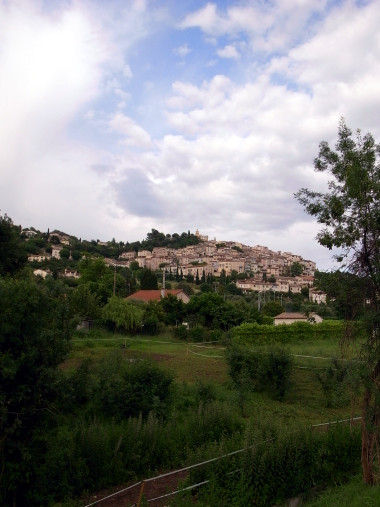
On Wednesday we went to Stephanie’s one-time childhood hometown of Fayence to visit with her grandmother who wouldn’t be able to attend the wedding and her aunt who was staying there in order to attend the wedding.
We were also going to pick up some things for the wedding, so we loaded the car with a foosball table (baby-foot), and then stopped by for a little conversation accompanied by some cream puffs (les choux à la crème) and Clairette de Die, her grandmother’s favorite sparkling wine.
The weather patterns this time of year are such that it’s often sunny with big white clouds on the coast, while inland the blue sky disappears and the clouds grow dark gray and forbidding, unleashing the occasional afternoon thunderstorm. We encountered this phenomenon on our last trip to Fayence and this time things were the same, plus rain.
So we really didn’t have the time or the weather for a walk around the centre-ville, but I managed to get a shot of Fayence’s dense hillside layout just as the rain was passing. Though her grandmother lives in the “countryside” surrounding the center of town, it strikes me how densely these old, small villages were (and still are) built.
This past year, Stephanie and I were able to visit some relatives we hadn’t seen in a long time. Three years had passed since she’d visited her family in France, and it had been at least as long since I’d seen my grandfather in Buffalo. For some reason—maybe experiencing it together amplified things—we left feeling more aware of the distance than we had before.
Though we both like to think we’re pretty accessible via blog and email, we know the internet doesn’t make it all the way to our grandparents. So we wanted to create some sort of physical, visual artifact that would. Something to make the distance and time between visits seem less great. Given our photo-centric adventures, we started thinking about compiling a photo book.
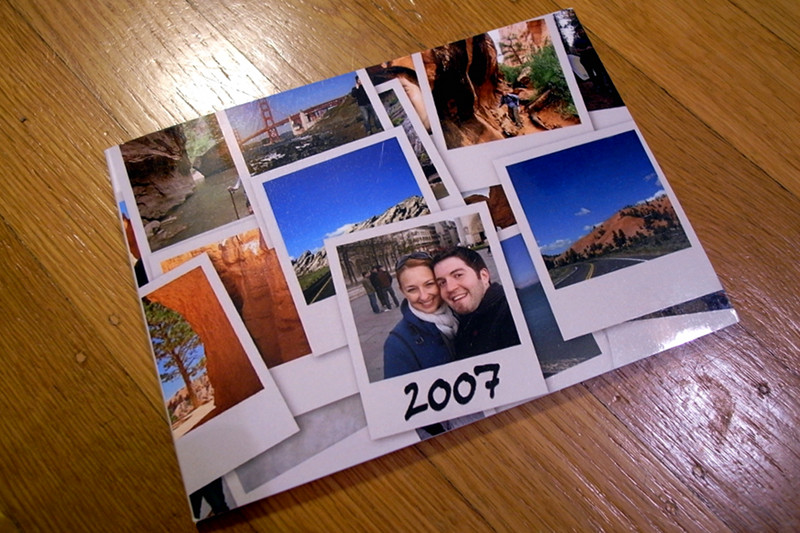
The final product
After Thanksgiving I started to go through all the photos I’d taken in 2007 (there were over 4,200!), looking specifically for pics with either or the both of us in them. By the time I got through them all, I’d collected over 80, many of which had never seen the light of day (we don’t usually highlight those cheek-to-cheek shots on our blogs).
Then I started surveying the photo printing sites that did photo books, like Kodak, Shutterfly, and Lulu. I’m not sure what exactly I was looking for, but when I stumbled upon Viovio, I knew I’d found something…unusual. At first I was a little put off by their wiki-centric website, but the more I explored their offerings (discovering things like linen hardcover binding) the more I liked what I saw.
They offered two primary ways to prepare a book for printing: upload a PDF (ostensibly created with some fancy Adobe software I didn’t have) or upload individual images into a gallery which they’d generate a PDF from. I wasn’t about to layout the book myself, so I started by uploading the 80 or so photos I’d set aside (which I was able to do as a single zip file).
Their photo gallery to PDF creator was pretty neat, you could specify how many photos you wanted on each page and it would arrange and resize them to fit, with lots of fun options like full bleed pages and chapters. Or you could decide which photos you wanted on each page by manually numbering them yourself. This is the approach I took, leaving horizontal photos alone on a page, and putting two vertical photos side by side. You might remember a blog post where I surreptitiously wrote about this: A little weekend math.
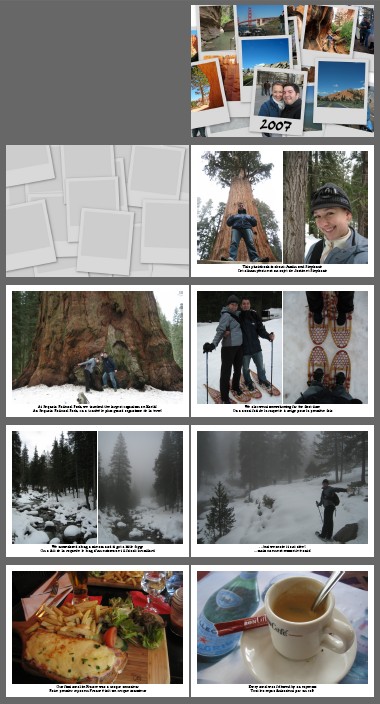
This was working well enough, so I started uploading additional pictures of some of the incredible sights we’d seen along the way. It went on like this for a few nights, I’d upload photos, rearrange them, confer with Stephanie, regenerate the PDF (which took a few minutes), and repeat. The hardest part was not setting up individual pages, but making sure certain related photos on two different pages appeared next to each other, one on the left and one on the right (e.g. the croque monsieur and the espresso at the bottom of the layout screenshot below).
I alerted them to the limitations of their PDF generator, which they confirmed, but had no timeline for fixing. Meanwhile I was running out of time. Their Christmas ordering deadline was fast approaching, and my expectations were rising. I had a vision in my head (and on graph paper) of what I wanted the book to look like, and the limitations of their generator (or my use of it) only further clarified what I wanted.
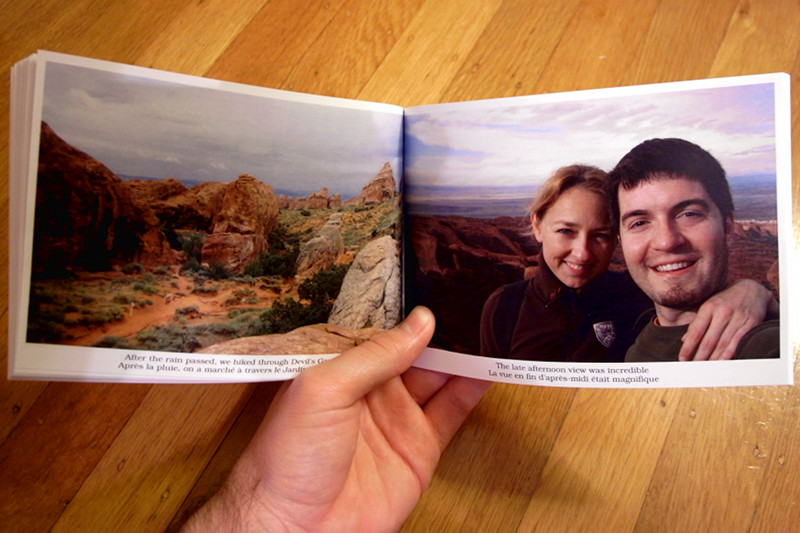
What I wanted was simple. One horizontal photo to a page or two vertical photos to a page, with just enough space at the bottom for two lines of text (English and French captions) and small margins around the edges to maximize the photo size. I started thinking maybe I could write a little PHP program to generate the PDF to my specs. How hard could that be?
Well the hardest thing was deciding on a PDF library to use. PDFlib is the most full-featured and up-to-date, yay for proprietary software, but on the other hand I couldn’t just apt-get install it. In fact, no matter what I tried, I couldn’t compile and install the trial/free version at all. What a waste of time. Boo for proprietary software.
But it’s not like I needed anything fancy. Just multiple pages, photos, and two lines of text. So I turned to FPDF and never looked back. I think it took less than an hour to go from zero experience to a proof of concept photo book generator. In fact I was progressing so fast that I stayed up till 2am one night to get the whole thing done. That’s just the best feeling in the world.
It took another day to polish the code, proofread the captions (in two languages), design a cover (Stephanie used Picasa), and suddenly we were done. I uploaded the 160MB PDF (74 pages, 99 photos), ordered a bunch of copies, and couldn’t wait till they arrived.