What’s so cool about Firefox 1.5?
- Moving back and forward is blazingly fast
- Drag-and-drop reordering of tabs
- Tabs use a thumbnail of a standalone image for favicon
- Error pages for HTTP errors instead of annoying modal popups
- Native SVG and <canvas> support (SVG samples)
- Reload works in View Source window!!!
- View source shows the actual source, with no code cleanup
- How did I not know about the
view-source:pseudo-protocol before? e.g. view-source:http://justinsomnia.org/ - Accidentally opening a tab (Ctrl+T) in a popup window now displays the tab selector toolbar (bugfix)
- update: When focus is in a textarea (as it so often is), page scrolling is no longer locked (which kind of makes me nauseous/disoriented since I’m SO used to the old behavior)
Get Firefox 1.5!
Update: Problems I’ve had since upgrading to 1.5
- Highlighted items in the Bookmarks menu flicker on hover (after extended use without restarting browser) just like the description here.
- Uninstalled extensions don’t disappear from list after restarting browser
Strange interaction between the Web Developer Toolbar and the integrated search box, which causes a view-source window to popup after submitting a search term
The first issue I only saw at work, and the second two I’m struggling with at home. I’m going to uninstall and reinstall Firefox and see if things work better from scratch.
Figured out number 3. I’ve been playing with Josh’s VSIT extension based on my View Source in Tab bookmarklet, but in order to get VSIT to work right, I removed the Web Developer toolbar’s shortcut for View Source (which is also Ctrl+Shift+U, same as VSIT). For some reason whenever a search term or URL was entered, the Web Developer Toolbar would trigger the view source window. This of course is fixed by choosing a different keyboard shortcut for the Web Developer Toolbar’s view source function, instead of leaving it blank.
Groan, it gets worse
So I uninstall Firefox, restart my computer, and delete my profile, the latter having the largest implications I hadn’t considered fully, that I will have lost the sum total of my saved form field values, which is something I quite like. Luckily that folder should be sitting happily in my “Recycle Bin” on the off chance I wish to restore some part of it.
So I launch the clean slate version of Firefox 1.5… and the status bar is b0rked? WTF?
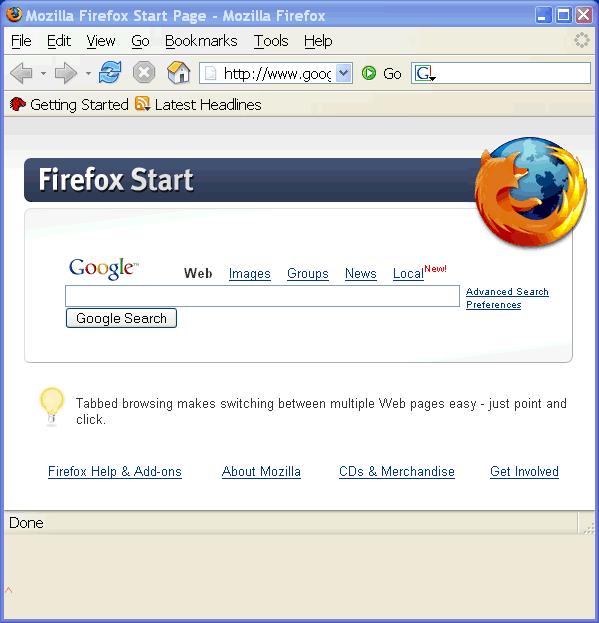
Same thing after I restart the browser. The gray area beneath the status bar remains if I turn off the status bar. And for some reason there’s a red caret in the lower-left. I’m stumped.
is there a way to put the tabs on the bottom of the window yet? on my laptop, that would be pretty freaking useful.
I didn’t think so Robin, but check this out!
Basically just rename the file:
userChrome-example.csswhich is located here:
to
userChrome.cssThen edit the file in a text editor and add the following CSS code to the bottom:
#content > tabbox {
    -moz-box-direction: reverse;
}
Restart Firefox and voila, tabs at the bottom.
Jiminy Crickets! Rad! I’ll have to give that a try.
Holy SHIT, Batman! I LOVE view-source!
Check it out, I made a bookmarklet that toggles between
view-source:and the rendered html view, in tab!Yup, that’s b0rked all righty.
At least I’m not the only one. The only way I could figure out how to fix this is by dropping my old profile folder back in. Disappointing.
dude, I just installed firefox 1.5 after having 1.0.7, and I got the same red caret of death. it is a problem with one of your extensions. After removing a few of my extensions, it went away. I had a few extensions that were incompatible with 1.5, like “download manager tweak” and additionally firefox 1.5 showed 2 copies of Linky. I removed the incompatible ones (even though they should be disabled) and removed both copies of Linky. And after a restart of Firefox it was gone!
Hmm, perhaps there were extensions installed and remaining in my main Mozilla Firefox program files directory after uninstallation that I hadn’t removed. Anyway, I managed to get things working by reverting to my original profile.
Red Caret of Death, I like that.
Jerome, I’m having the same problem with that annoying red caret. I uninstalled all my extensions, restarted, and I’m still having the same problem. Argh.
…And another thing – every other time I open FF the File, Edit, etc. menus are greyed out and my bookmarks toolbar is gone (and I still have the red caret problem.) Next time I open it, they’re back (but with the red caret.) Rinse, repeat.
OK – fixed it. Sorry for abusing this comment space…
Steps:
1. Backup bookmarks and profile.
2. Uninstall Firefox completely. (this means manually deleting the c:\program files\mozilla firefox directory. I also cleaned out the registry just in case.)
3. Restart Windows.
4. Re-install Firefox. (Check to make sure the extended status bar and red-bastard-caret are gone.)
5. Copy profile back / import bookmarks.
Jesus, upgrading shouldn’t have required all that.
When I uninstalled Session Saver, the red caret and wide space at bottom of browser window fixed itself.
Just installed 1.5 and encountered the red caret problem.
Uninstalled the disabled (incompatible extensions) – no help.
One of the postings mentioned two versions of Linky (I had that too) so I uninstalled the older version and the red caret went away. Problem fixed.
I’ve also had the same problem with the red ^ below the status bar. This post and it’s comments helped me solved it. I had two versions of Linky and by removing the oldest and restarting Firefox the problem was solved. Thank you!
ran into this red carat of death bug today updating to 1.5.0.5… i don’t use ‘linky’, so that wasn’t it. i do have a good number (10 or so) of extensions installed, however.
tried updating my extensions… nope.
disabled all extensions… fixed.
renenabled extensions one by one and… it never came back… ???
so, if you’re updating to 1.5.0.5 and get the weird space under your status bar, try updating your extensions, disabling them, then exit and reopen firefox and renable the extensions. thought this might help someone… :)
I tried to change the theme to get rid of the blank area and noticed that wasn’t working, so I then discovered the firefox.exe process wasn’t going away. Stopped that and restarted firefox and the blank area was gone. Slightly easier solution than some here, just kill the firefox.exe process.
darrenf, your method worked, thanks. It was driving me nuts!!!
I had this same problem. I think it has to do with Linky… I updated my extensions, then noticed I had two versions of Linky. I uninstalled the old linky and restarted firefox, and the red caret thing was gone.
Red Caret of Death disappeared when I uninstalled the toolbar from TimeMatters 8.0 which had installed itself (without authorization) during a recent update.
Problem solved by uninstalling the Netcfraft extension
had same problem, follow darrens advice, i just updated my extensions/add-ons and restarted Firefox and that took care of the problem
HOLA,YA RESOLVÍ EL PROBLEMA CON LA BARRA DE 3 CENTÍMETROS DE FIREFOX PROBLEMÁTICA PARA MÍ,GRACIAS.CHAO!!!!!!!!!!!
I have been struggling with the RCoD bug for months using Mozilla SeaMonkey.
Not using any of the mentioned extensions here. Deleting and reinstalling everything has made no difference at all.
After a decade of Netscape/Mozilla usage I have moved to Opera. There’s a write-up and an image at ihelpyou.com/forums/showthread.php?t=26281 if anyone can help with further suggestions.
I also have the the grey area with a red carat that does not go away. I have tried everything that Firefox Support says to do… and nothing.. it still exists to my dismay…. and I’m getting very P.O. about this. Can somebody who honestly knows what to do, help me with this issue?