Query Rosetta Stone
Natural Language
One person can be in one or many photos and one photo can contain zero, one, or many people. List all the people who are in photos along with the filename and the description of the photo(s) they are in. People and photos may be listed multiple times, but a person will never be in the same photo twice (assuming the photos haven’t been doctored).
Microsoft Access Query by Example (QBE)
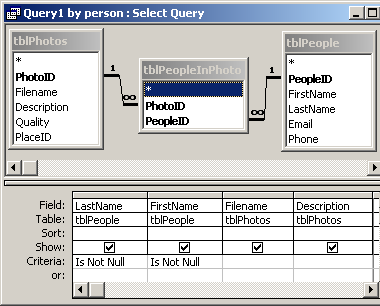
SQL generated by Microsoft Access
SELECT [tblPeople].[LastName], [tblPeople].[FirstName], [tblPhotos].[Filename], [tblPhotos].[Description] FROM (tblPeople INNER JOIN tblPeopleInPhoto ON [tblPeople].[PeopleID] = [tblPeopleInPhoto].[PeopleID]) INNER JOIN tblPhotos ON [tblPeopleInPhoto].[PhotoID] = [tblPhotos].[PhotoID] WHERE ((([tblPeople].[LastName]) Is Not Null) And (([tblPeople].[FirstName]) Is Not Null));
SQL cleaned up for readability
SELECT tblPeople.LastName,
tblPeople.FirstName,
tblPhotos.Filename,
tblPhotos.Description
FROM (tblPeople INNER JOIN tblPeopleInPhoto ON tblPeople.PeopleID = tblPeopleInPhoto.PeopleID)
INNER JOIN tblPhotos ON tblPeopleInPhoto.PhotoID = tblPhotos.PhotoID
WHERE (tblPeople.LastName Is Not Null) AND (tblPeople.FirstName Is Not Null);
Relational Algebra
join tblPeople and tblPeopleInPhoto
R1 ← tblPeople equijoinPeopleID=PeopleID tblPeopleInPhoto
join the result of the first join, R1, with tblPhotos
R2 ← R1 equijoinPhotoID=PhotoID tblPhotos
select only those R2 records where LastName is not null
R3 ← σ LastName != Null (R2)
select only those R2 records where FirstName is not null
R4 ← σ FirstName != Null (R2)
intersect (AND) R3 and R4
R5 ← R3 ∩ R4
project 4 fields (columns) in the final Result
Result ← π LastName, FirstName, Filename, Description (R5)
Note: If the characters above don’t look like arrows, sigmas or pis, try the PDF version.