Ubuntu on a Lenovo ThinkPad X100e
Stephanie’s brand new ThinkPad X100e arrived today, so I got to have some fun tonight and set up Ubuntu on it for her.
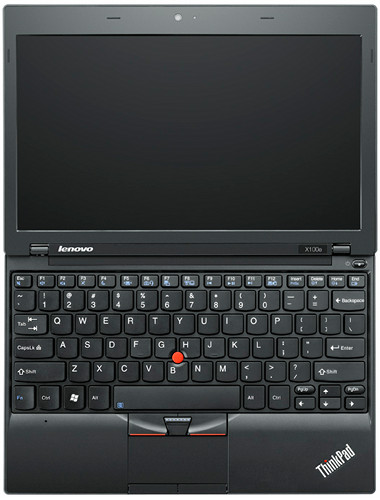
Installation via memory key
This was the first time I’d installed Ubuntu via memory key. Means I might not need my portable CD-ROM drive anymore…
- Downloaded the latest Ubuntu AMD64 Desktop ISO using BitTorrent
- Ran
usb-creatorto copy the ISO to my 2GB USB memory key (based on these instructions: Installation From USB Stick) - Got the “DBus error” like the instructions anticipated, so ran the following command to format my memory key:
sudo mkfs -t vfat /dev/sdb1
- Then I reran
usb-creator - Plugged the memory key into the X100e, booted it up, and installed Ubuntu
Getting wireless to work
Of course, bane of Linux, wireless didn’t work out of the box. This tends to be expected with brand new hardware, and it took me a while to piece together the right steps to get it working.
- Basically run exactly these commands (even
sudo su):sudo apt-get install build-essential wget http://launchpadlibrarian.net/34090404/rtl8192se_linux_2.6.0010.1012.2009_64bit.tar.gz sudo tar -xvzf rtl8192se_linux_2.6.0010.1012.2009_64bit.tar.gz cd rtl8192se_linux_2.6.0010.1020.2009_64bit sudo su make make install
- Then reboot and you have wireless
Note: If you run the Update Manager and it contains a new Linux kernel, you’ll need to rerun make install in ~/rtl8192se_linux_2.6.0010.1020.2009_64bit to reinstall the wireless drivers. So don’t get rid of the rtl8192se… directory. Hopefully this will cease to be a problem in the next release of Ubuntu.
Getting the TrackPoint scroll button to work
Apparently xorg.conf is a thing of the past, which kind of obsoletes my previous TrackPoint “scroll button” instructions. Oh well. This is how you do it now.
- Install and run gpointing-device-settings
sudo apt-get install gpointing-device-settings
gpointing-device-settings
- Select TPPS/2 IBM TrackPoint on the left
- Check “Use wheel emulation”
- Select button #2
Getting the headphone jack to work
I didn’t realize this was a problem at first, but thanks to all the comments, folks got to the bottom of the issue. This is what worked for me.
- Edit /etc/modprobe.d/alsa-base.conf
sudo gedit /etc/modprobe.d/alsa-base.conf
- Add the following two lines at the end of the file:
options snd-hda-intel model=lenovo-101e
options snd-hda-intel position_fix=1 enable=yes
- Restart the computer
you should life close to me ;-) … i was not tuff enough to bye my last computer without windows :-((. perhaps the next one.
I m using Ubuntu 9.10
I see ‘No bluetooth adapter present’ under the
System -> Preference -> Bluetooth.
Therefore the system cannot detect any bluetooth signal.
How can I solve this problem?
Great post! Just activated my scroll button on a Z61P – and I’m happy knowing what to do with the wifi when my X100e arrives.
Lau, sorry, I didn’t order the X100e with Bluetooth, so I don’t know.
Thank you for the post!
Is your microphone working? It seemed to work when I ran a live session off the USB and then following install I cannot get it to work!
After working for a day, my x100e stopped recognizing the wireless card. So now I’m trying the 32 bit version. So far so good.
Jack, it’s actually my girlfriend’s laptop, so I haven’t had a chance to try out the microphone. Were you using the built-in mic, or the combined headphone/mic port?
Brian—did you perhaps recently update Ubuntu? Anytime you get a new Linux kernel in the update, you’ll need to rerun the following in the rtl8192se_linux_2.6.0010.1020.2009_64bit directory:
RIght on, thanks Justin!
I was trying with the built in mic. I don’t have an external mic to try out.
Thanks so much for the info! My X100e should be here next week (it’s in Alaska right now, I’m in Florida ;]) and this helps a bunch.
i’ve got a x100e today, and this post really helped. thank you.
thanks a lot, just purchased x100e yesterday. TrackPoint button works well. wireless is not tested yet..
thank you. track points works well for x200 too
The kernel 2.6.31-19 update is causing my system not stable (wifi and usb ports not usable after a certain period) .. thinkpad x100e user pls beware!
thank you so much, any idea of how to get the USB Port replicator with DVI to work?
josh, sorry I don’t have a USB Port replicator, so I’m not sure…
No problem Justin, I’ll keep pounding and provide some info if i get it working. My wifi is really flaky? seems to go off and on, sometimes after a reboot i get a red screen with white squares… Have you experienced the same?
FYI… been following https://bugs.launchpad.net/ubuntu/+source/linux/+bug/401126?comments=all and installed rtl8192se_linux_2.6.0014.0115.2010
redid sudo su, make, make install and it has been up for almost an hour now. still a bit slow, but it works.
I’m going to follow it and see if a good driver results from it.
josh, actually it’s my girlfriend’s laptop, and she hasn’t informed me of any wifi issues. Was watching hulu.com earlier tonight without any problems.
I did get this problem too..after a reboot i get a red screen with white squares.. :(
hi lau, my squares have seemed to vanished after the latest driver i posted. all is good, but wireless only works on when power is on.
hi josh,i installed the new driver and yes u r correct, wifi only works with power mode and NOT battery mode.
trackpoint scroll: http://www.thinkwiki.org/wiki/How_to_configure_the_TrackPoint#Hal_.28soon_to_be_deprecated.29
I installed Ubuntu 9.10 (32bit) on my x100e, but the fan is runing all the time. I read about problems with the temperature control when using Linux on Thinkpads. Do you not have that problem?
I don’t think I’ve noticed that. I’d highly recommend installing the amd 64bit version of Ubuntu though, as the processor is 64bit, and will allow you eventually to address over 3GB of memory.
I’ve installed 9.10 on my x100e, and the problem is when i plug my earphone on it, the speakers won’t turn off. Do you have this problem ?
I’ve installed rtl8192se_linux_2.6.0014.0115.2010 and am able to connect to my wireless AP. However I cannot go to any websites or ping anything. Any suggestions? TIA
First off, thanks so much for sharing extremely helpful information!
I have the same problem as Daniel wrote above. When I plug in headphones, the main speakers won’t mute. When I try to turn down the volume, the sound from headphones goes down as well. Ext. mic works fine.
This could be an Alsa mixer issue, but don’t know how I can get this fixed… Any suggestions?
@cooldood
See my post on https://bugs.launchpad.net/ubuntu/+source/linux/+bug/401126/comments/261
and download the latest driver from https://bugs.launchpad.net/ubuntu/+source/linux/+bug/401126/comments/260
Hope this helps, it is working fantastic for me on 64 bit
josh@josh-laptop:~$ uname -a
Linux josh-laptop 2.6.31-20-generic #57-Ubuntu SMP Mon Feb 8 09:02:26 UTC 2010 x86_64 GNU/Linux
hi Justin, nice article
I’m gonna to purchase this machine and yes i’ll put Ubuntu 9.10 on it. But as Joh said above wireless only works on when power is on, and this what i concern about.
1) Did you got the same problems on yours?
2) Did the wifi problem stay when we’ve update the BIOS? ( http://www-307.ibm.com/pc/support/site.wss/MIGR-74275.html )
Thx, i’ll wait for your reply
Adee, my girlfriend has had no problem with wifi using Ubuntu 9.10 on the X100e. We haven’t touched the BIOS. The only thing to keep in mind is that if you run the Update Manager and it contains a new linux kernel, you’ll need to rerun the “make install” from the “rtl8192se_linux_2.6.0010.1020.2009_64bit” directory to reinstall the wireless drivers. Hopefully in the next Ubuntu release, this will no longer be necessary.
Hi Justin, thanx for the quick reply
That’s great, i’ll get mine on the few next week. And I hope u don’t mind if i’ll ask you some question if i face some problems on it since i barely new on Ubuntu:-)
Thx a lot bro
For those of you trying to utilize the bluetooth adapter: The only way I could figure out to enable the adapter was to boot the pre-installed Windows 7 and enable the adapther through Fn+F5. Bluetooth works like a charm now (I use it for tethering). Sadly, I couldn’t figure out any way to do this from linux, because the “/proc/acpi/ibm”- or “/sys/devices/platform/thinkpad_acpi/” hierachy is completely missing on my system (Mint 8, 64bit). Any ideas would be appreciated :)
i have problem on wireless. after stanby mode, my wireless cant connect again. I need to reboot ubuntu first, and wireless will working. how can i fix this problem?
@rizal: are u using Realteks latest driver version (015)? It’s working fine here, even on 64bit system. Installation method was the same as described by justin.
@webler: i try realteks rtl8192se_linux_2.6.0015.0127.2010. i think this is latest driver i use..
i find how to wireless after standby mode. i just edit /etc/default/acpi-support
# Add services to this list to stop them before suspend and restart them in
# the resume process.
STOP_SERVICES=”networking”
Hi Justin, Thanks about your explanation about turning on wifi in X100e. I hope the next Ubuntu 64-bit included Realtek wifi driver and We don’t have to re-install the driver :)
Street Fighter 4 benchmark.
http://www.youtube.com/watch?v=SgA467Bs8aU
Above video is using 1280 x 720 with model quality to High.
Performance will improve when scale down to 800 x 480 resolution and model quality to Mid.
hi all, i’ve got mine today.. i just install it with ubuntu, and yes i have same problem as Lau had : No bluetooth adapter present…
any clue how to fix this?
lsusb and lsdev always show negative
Hi Adee, this is because the x100e is having bluetooth OFF by default setting.
Try press FN+F5 to enable it. As for me, it’s not working, therefore I installed Win 7 and then need to install this: http://www-307.ibm.com/pc/support/site.wss/MIGR-74261.html
After that, only I got FN+F5 key working in order to enable bluetooth.
@lau : it’s weird but hey it works!! thanx lau
i didn’t install windows on it yet. I use winxp lite (u can find the iso at the piratebay, they modified it with reatogo) burn it on my 8GB usbdrive, boot with it, install all the x100e driver, and finally turn on the bluetooth :-)
thx a lot bro …
Thanks for the useful articles, Justin! Without your info on the X100e Wifi adapter, I would not have bought one. I.e., since there are so many features and functions of Linux that I need, I wouldn’t have bought my ThinkPad X100e if I had to be limited to WiFi with Win7 – I bought it to run Ubuntu.
I followed the instructions, but the WiFi just wouldn’t work. Finally, I tried booting in Win7, which wouldn’t use the WiFi at first – it was turned off. Turning it on in Win7 fixed it for Ubuntu as well! So, here are the steps that worked for me:
-Delete the original r8192se_pci.ko modules from /lib/modules//kernel/ubuntu
-Download the latest rtl8192se linux driver from the Realtek site and extract it.
-As root, run
make clean
make
make install
-Boot into Win7 and enable the adapter and confirm by connecting to a nearby AP.
The WiFi seems to be working very well under Lucid Lynx with the latest updates. In fact, a problem with the brightness buttons went away after the last Lynx patches.
Aloha,
-Jeff Mings
Tech, you saved my day. Your cookbook instructions on ‘Getting wireless to work’ were perfect. They succeeded on my (preliminarily) 32-bit installation without a change. Thanks.
This howto saved my live :) Finally get rid of the lame win7.
What I noticed so far: the fan is really annoying, in ubuntu even louder as on win7. is there any way to control the fan? I installed the latest bios v1.20a but the fan still kept running all the time…
Downloaded latest driver from realtek
http://www.realtek.com.tw/downloads/downloadsView.aspx?Langid=1&PNid=48&PFid=48&Level=5&Conn=4&DownTypeID=3&GetDown=false&Downloads=true#RTL8192SE
Compiled it and copied firmware to to it’s location as mentioned in the readme file delivered with the sourde.
Everythink working fine now.
ubuntu 10.04beta2 64bit on a x100e fresh install
For fixing bug with sound jack (sound speaker enabled always, with and without headphones) you can us it:
sudo vi /etc/modprobe.d/alsa-base.conf
add this option:
options snd-hda-intel model=”olpc-xo-1_5″
reboot.
Hi all,
I tried ak-47 suggestion. It works nice both on Ubuntu 9.10 and Slackware 13-64. But no way to get any sound recorded from internal mic with either! All other devices work very well (mmm the internal wifi with realtek drivers is put to power saving when screen is switched off and won’t wake up any more. Need to force module unloading and reloding…). Also, no idea why, but with linux mint 8 live, audio jack works properly and the mic too! Does anyone have a suggestion ?
Bye.
Bramb
@ak-47 :
that trick didn’t work for me :-(
any clue?
I guess the bluetooth and other problem on this x100e is related to the fact that this machine’s EC different than other thinkpads. https://bugs.launchpad.net/ubuntu/+source/linux/+bug/557736
Problem with wireless card. Error code “rtl819xSE 0000:03:00.0: PCI-DMA: Out of IOMMU space for 9100 bytes”
Apply the patch rtl8192se_IOMMU.patch from https://bugs.launchpad.net/ubuntu/+source/linux/+bug/401126/comments/80.
2Adee
I use Debian/GNU Testing 2.6.32-3-686 =)
ALSA works fine.
@ak-47
that trick didn’t work for me too :-(
i’m using ubuntu 10.04 lucid lynx..
This tutorial is incomplete, after installing Ubuntu 10.04 for either 32 or 64bit (AMD) you will be exposed to:
https://bugs.launchpad.net/ubuntu/+source/linux/+bug/535653
Which is a hard freeze when unplugging the AC power, only resolution is to reboot the system. So, keep the netbook pluged in, update the system:
apt-get update
apt-get upgrade
Install the *proprietary* ATI driver:
apt-get install fglrx
Reboot, you are now safe to remove the AC power.
Also, I had no problem what soever with the wireless drivers or sound.
Hope this helps.
Did you have any issues with the graphics card making the display wonky? I’ve had lockups on the install reboot with the kubuntu 10.04 isos in both i386 and amd64. I can log on to a command-line, though, so the problem may well be graphical.
Did you upgrade anything in your BIOS before install?
Those of you having graphical issues with Lucid (ubuntu 10.04) on the x100e:
I’m running the radeon driver, not fglrx. After upgrading from Karmic to Lucid, the desktop froze hard as soon as KDM launched. I got past this with the latest microcode (1.23) but this just delayed the freeze until the desktop started to render. The solution is to add the boot option:
radeon.modeset=0
and the freezes are gone.
See http://swiss.ubuntuforums.org/showthread.php?p=9210552
this is a great tutorial/info trove. has anyone come across any resources for mapping custom thinkpad keys in ubuntu (such as the mini-page up pg down keys for forward/back functionality like they were on the 7 row keyboard)? thanks!
ak-47’s fix for the audio only worked temporarily, now it’s back to the same thing.
are there any fixes for the headphone jack issue other than a kernel patch?
can’t seem to find anything else on google / ubuntu forums…
forgot to mention my specs..
Ubuntu 10.04 LTS
Yep, worked out that using the ubuntu-alsa-dev ppa (sudo add-apt-repository ppa:ubuntu-audio-dev/ppa)
Then instal the kernel appropriate linux-alsa-driver-modules-2.6.32.xx package and NOT the backports-module package that the driver-modules container package.
Reboot and for me at least, internal mic works great, muting upon inserting headphones works.
The downside – any time there is a kernel update you need to re-install the module
thank you jack <3
http://www.thinkwiki.org/wiki/Category:X100e
ThinkWiki – is brilliant. I use it since ThinkPad T40
Most of the X100 glitches are fixed on kernel 2.6.35-rc2:
Radeon works even with the open source driver and even with the kvm enabled.
Thinkpad acpi works w/o patching it
qcserial (needed by gobi 2000 modem) works w/o patches on the code but still needs a 2 row patch to add the correct PID of the lenovo version modem.
Just add 2 lines at the start of qcserial.c
{USB_DEVICE(0x05c6, 0x9204)}, /* X100e Gobi Modem device */
{USB_DEVICE(0x05c6, 0x9205)}, /* X100e Gobi Modem device */
I had a hard time figuring out how to get the WWAN (UMTS) card to work with Ubuntu Linux. This is my howto (the kernel update also fixes the hotkeys/acpi issues):
http://www.nulldevice.de/2010/06/wwan-lenovo-thinkpad-x100e-ubuntu-10-04/
Hi, I am using Ubuntu Lucid Lynx and the problem that I have is that I am unable to use my headphones at all. When I put the headphone in the jack, no sound comes from the headphones (and it continues to, from the speaker). Can you please suggest something? I have the amd dual core (with 4 GB ram) model. Help!
aditya, read this: http://forum.thinkpads.com/viewtopic.php?f=59&t=88534
Kubuntu 9.10 installs using these instructins, although I had to do
sudo apt-get update
before the install would find build-essential.
However, trying to get 10.04 up has failed, both by upgrading and a clean install. Reboot after install throws a message
“Failure to allocate MMIO…” and hangs at the disk drive icon on the startup screen. This isn’t a big deal since I’m generally happy with 9.10, but I am curious.
found an alternate fix (with some help) for the mic and earphone jack problems here: http://www.linuxant.com/alsa-driver/
Purchased x100e today and spent several hours trying to get it boot from the USB stick. Unfortunately, not luck — getting “Operating System not found” message. Have tested the stick with another computer — booting perfectly.
BIOS boot sequence has USB HDD as the first entry followed by USB FDD and USB CD-ROM.
For some reason the USB HDD entry is pre-pended with a dash: -USB HDD.
Could anyone please assists? Thanx a lot.
I have Lucid 32 installed on an x100e with the latest ubuntu kernel available which appears to be 2.6.32-24-generic-PAE. When I have the option set in power management to sleep the monitor after x number of minutes the display does not wake back up. I did not notice this with previous kernels on the system. I’m using the fglrx driver BTW. Any ideas about this one other than not letting the screen not go to sleep?
Here is my script for installing a proper thinkpad_acpi module under lucid (for 2.6.32 kernels)
BTW, On my MV-40 I am running cpupowerd to undervolt to 0.725V@800MHz and 0.8V@1600MHz.
Works great!
@Messerjocke :
would u give me the script for amd64 running Karmic ?
thanx
Actually, I am still not able to make the headphone work. The solution that is mentioned in the thinkpad forum that “the solutor” pointed out isnt working (it just worked once, for some strange reason). Can someone help me out, please :-)
If you experiencing non-workinkg wifi isuue after installing 2.6.35 kernel You should perform steps 10-13 from this manual http://www.nulldevice.de/2010/06/wwan-lenovo-thinkpad-x100e-ubuntu-10-04/
At least, my problem was solved.
BTW I’ve added linux kernel repos fromlaunchpad to install build-essentials
If anyone experiencing troubles reinstalling alsa driver with 2.6.35 linux kernel – better use latest alsa snapshots from http://www.alsa-project.org/snapshot/
also you need to install xmlto (sudo apt-get install xmlto) to compile alsa-utils
Can anyone help me? I’m using Ubuntu 10.04 on an X100e. My microphone and headphone jack didn’t work, so I followed the advice mentioned above and installed alsa-driver-linuxant from http://www.linuxant.com/alsa-driver/. That killed all sound output from my computer: the speaker showed as permanently muted, and I couldn’t even open System > Preferences > Sound. Not only that, but it gave me serious performance problems with other software.
I uninstalled alsa-driver-linuxant, and now system performance is back to normal – but I still don’t have any sound output at all. Can anyone suggest how to get it back? The microphone and headphone jack are obviously now lower priorities…
ubuntu 10.04 desktop amd has included the wifi function for X100e, and it worked extremely well on X100e
Rob:
I was also forced to uninstall the alsa-driver-linuxant, after which I did not have any sound (my system is debian squeezy amd64). I solved it by reinstalling (key “L” in aptitude) the kernel package: linux-image-2.6.32-5-amd64, which rebuild the necessary modules for sound to work.
I still have the problem that the microphone is not working. My attempt to install the alsa-driver-linuxant_1.0.23.0_all.deb failed due some build errors. Can someone help me with this? What are the required packages to correctly build the linuxant driver?
but, how can I get the drv for bt for ubuntu on x100e?
The system has freezes when I pressed fn+f5
Michal: Thanks. In fact just today I have found a solution to get the internal mike and the headphone jack working: I edited /etc/modprobe.d/alsa-base.conf to add these two lines:
options snd-hda-intel model=lenovo-101e
options snd-hda-intel position_fix=1 enable=yes
(as suggested by “jeffmings” in this thread: http://ubuntuforums.org/showthread.php?t=1489185&page=4 )
I am now using the Ubuntu 10.10 beta (kernel 2.6.35), and have not tried to reinstall the linuxurant driver. But still adding those two lines to alsa-base.conf has made everything work properly. Hope that helps you too….
Just wanted to share that I managed to finally solve the microphone problem by upgrading the linux kernel to version 2.6.35.
On my x100e notebook I am running Debian testing amd64.
1) Using apt-get, I upgraded kernel to Liquorix Kernel 2.6.35 (2.6.35-6.dmz.3-liquorix-amd64) as found on http://liquorix.net/ . This was very easy, but as expected it broke the wifi (rtl8192se) and video (fglrx) modules. (note that Debian testing repository contains kernel 2.6.32)
2) Installed wifi driver rtl8192se from Realtek as instructed on http://www.thinkwiki.org/wiki/Category:X100e .
3) Installed proprietary but nicely working ATI Radeon driver fglrx-8.771.2 (fglrx-8.771.2-catalyst_10.9_linux_hotfix_sep27.zip) as
instructed on http://support.amd.com/us/kbarticles/Pages/GPU83ATICatalystLinuxHotfix.aspx .
And that’s it, wifi, fglrx 3d acceleration, sound, mic, thinkpad_acpi, all are working well (note that I did not add any options to alsa-base.conf).
Yes, i too having problem enabling the headphone, when i plug in, both sound appear
Hi there i just got ubuntu 10.4 on m x100e, it works fine as long as plugged in to power, but as soon as a I switch to battery it freeze. Anyone else having this issue? Any solutions?
Thanks in advance!
Hi guys, i have to take my comment back. I just applied some OS updates and it works fine now.
BTW: thanks for the trackpad tip!
http://sites.google.com/site/linuxonthinkpadx100e/
before i made these changes , when i plug headphones, headphones not work and speakers dont muted.
after changes headphones work and computer speakers muted.
Thanks very much EgilsKr for the link, it worked first try
your instructions on how to make wireless works wonderfully. first time something actually works first time on ubuntu for me. I really would like the embedded 3G modem to work as well. Been struggling for days not to get this right.
I’m already installed this driver and it’s work, but i haven’t acces to internet.
I get IP from DHCP, and wi fi signal about 50% but ping and doesn’t work and i can’t use internet.
How i can test and solve it? Maybe i need config iptables?
My Wireless seems to work but my I can’t get the embedded 3G Qualcomm Gobi 2000 modem to work.
Hi,
my wireless initially works but then after a while it keeps disconnecting and asking for the password. Then it reconnects for a while before asking for the password again. Any ideas?
I never installed any wireless drivers, they work out of the box in 12.04 Beta.
Though the beta is unstable so i don’t recomend to upgrade yet, just wait some weeks :)
And thanks for the scroll button to work
I have used your wireless driver method multiple times and it works great!
Though the package only work up to linux kernel 3.5.0 (*buntu 12.10) and down, and needs a patch for 3.8.0 that i’m currently testing.
I have heard that 13.04 is going to have 3.7.0, but i have not checked that version, otherwise you will have to downgrade your kernel in the future on newer Ubuntu versions to be able to fix the wifi
Skip what i said, 3.8.0 has built in support for the wireless card and 3.8.0 is also going to be the new kernel for raring ringtail!
Very cool. Very easy. Thanks.