replacing a laptop lcd screen
To recap the saga from $895 of PAIN:
after doing some research into the guts of my laptop, i discovered LCDS 4 LESS had the screen for my laptop at a much reduced though still painful cost of $495. they also said it only takes about 15 minutes to install. so i’m going to do it myself, and then probably put up the busted but working LCD panel on ebay.
yesterday i finally had some uninterrupted time to sit down and take my laptop apart to replace the cracked lcd panel. i found a t40-series maintenance manual online which basically said take the whole laptop apart before doing anything. yeah right.
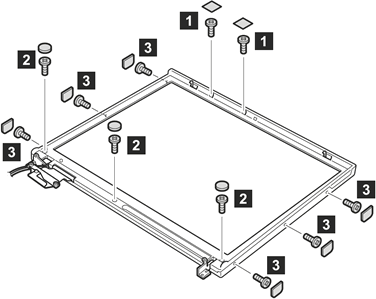
i skipped all that and unscrewed the 11 tiny screws that held the front plastic bezel in place, which i couldn’t do without first removing the 11 small black plastic stickers on top of the screws (see image below). eventually i got the bezel off (not an easy task), and then had to figure out how to unscrew the lcd screen from the support braces that held it in place. 6 screws later and the whole display unit is starting to fall apart in my hands. this is when i realize removing the whole lcd display unit from the base of the laptop might have been prudent.
i switch out the lcd screens, and suddenly find two hands are far too few when putting something back together. so jane held things in place at various angles as i tried to remember how everything fit back together.
before putting the persnickety plastic bezel back on, i powered the laptop up, and voila! 1400×1050 pixels of brilliance, not one dead or cracked. so the bezel goes back on, screws and stickers back in place, and i sit back, feeling quite smug that i saved $400 by replacing it myself in a little over an hour.
i take a break from the laptop, and when i come back to it 30 minutes later, i “wake” it from its sleeping state, it wakes, and then the whole computer just shuts off. i wonder to myself whether that battery had any charge. when i go to turn it back on, it begins starting up but immediately shuts off before getting to the IBM ThinkPad logo. “cruel gods!” at this point i’m too tired/frustrated to do anything more.
tonight, i decided to take the whole thing apart again (just to see), but this time with the speed and precision of a laptop disassembling pro. after the bezel comes off, i notice that the two wires that i thought supplied power to the lcd panel look crimped. i wiggled them, powered the laptop back on, and the screen started working, sort of.
at first it only stayed lit when i moved the trackpoint (mouse), then later (after logging in–with my fingerprint) it stayed lit permanently. i couldn’t determine a direct relationship between the wiggling of the wires and the functioning of the lcd panel. it’s almost like it took time for the power to flow all the way through the system.
anyway, it’s been working for the last fews hours without issue. i’ve restarted it, i’ve put it to sleep. the front bezel is back on, but not screwed in yet. whatever might have been wrong (any thoughts?) appears to have resolved itself in a very un-electronics like way.
i have a similar problem, after disassembling my lappy and putting it back together the monitor would work but freeze ocassionaly and sometimes it takes more than one attempt to start it. its a 15″ 1600×1200 and im really desperately trying to save it. i dont think ive damaged anything in the process of disassembly, no visible damage anyways. its a very delicate piece of electronics indeed.
dodger, the only thing i can suggest is taking it back apart and checking the two wires that i believe control the backlight power. make sure they’re not crimped, or pulled too tight. make sure they’re plugged in well.
so far, my replacement screen has been working perfectly without a single issue (knock on wood) since i took it apart and put it back together the second time. go figure.
Hello Justin, I’m just curious where you bought your replacement LCD,
FrankTheTank
frank:
http://lcds4less.com/
can you please tell me how i would go about finding out how to replace my screen? i purchased the screen i jsut odnt know how to do it. thanks!
bryan, my post above pretty clearly explains what i did. do you have any specific questions?
those two wires that go to the LCD panel on the T40 are the wireless antenna. anyway, i’ve been messing with mine, still displays but with no backlight. this after a slight drop while in a padded bag. i was thinking maybe the light cracked, but i don’t really know. what a pain.
With an IBM Thinkpad… are you able to easily upgrade (regardless of what video card is installed on your model) from XGA to a SXGA+ screen? I found a T40 with a cracked XGA screen for a dirt cheap price and I’ve been debating whether to take a chance on it (the replacement being SXGA+, of course).
kevin, yes, i agree that there were two wires on both sides of the lcd housing, covered in gray plastic that served as the wireless ethernet antennas. (or perhaps there was only one on the left side. i forget.
however, the lcd panel itself has both a flat ribbon connection, presumably providing the digital signal to drive the pixels, and two other wires, which come out of the lcd panel in the lower right, twisted together, which i believe control the backlight brightness.
wes, i doubt it. i did a straight replacement of a 1400×1050 lcd panel. i don’t know enough whether it’s possible to drop in a lower res or higher res panel. i’m assuming not.
Damn. I broke my laptop the same way you did Justin. This sucks, but I appreciate your putting this online.
Is there anyway to replace just the backlight, or does the whole screen need to be replaced?
robert, i honestly don’t know.
the lcd panel and backlight are encased together as a single part, and i didn’t recall it looking like the lcd panel could be further disassembled. it’s possible, though i’m not sure you could purchase a new backlight alone. i assume you’ll have to shell out for a whole new panel if your backlight has gone wonky.
Anyone know how to do this with a Presario? I’ve got a 2700, which I’ve now stripped right down, but I don’t want to wreck the screen. I found the issue, the groundplane wire has snapped, but it’s tight to the screen, so I can’t reach it without further stripping. I’ve removed 6 screws, but now I’m stumped…
soapy, i’d look for a presario service manual.
any ideas how to remove the screen from the base? If not, can I borrow Jane when I replace my screen?
huh? what? what happened? yeah you can remove the whole lcd panel, but often requires taking the whole beast apart to get to the right screws.
Someone totally hacked my name. funny.
Okay, so I am wondering if it is possible to upgrade my existing widescreen laptop lcd from a WXGA to a WSXGA+ resolution screen. Does anyone know if all the 15.4″ widescreens are the same dimensions and have the same connections. Theoretically I could buy just WSXGA+ lcd and replace my old one and BAM!! I have a beautiful WSXGA+ screen.
I was wondering if any of ya’s know if its possible to put a larger lcd screen into a laptop [not worrying about fitting size, because i probably won’t even have it fixed to the laptop], cus’ i have a 14″ screen on the laptop, and i ahve a junker laptop with a 19″ widescreen lcd. I was planning, if possible, to just replace the 14″ with the 19″ but mount the panel in a desk, and keep it with the actual laptop[thats under the desk too]. and use a normal keyboard and mouse… any idea’s if thats possible? and if it is, does it matter about brand?
i know it sorta defeats the purpose of a laptop.. but its cheaper using two laptops that don’t work rather then going out and buying a desktop pc :P
thanks for any help that anyone can give.
Troy
Troy, I doubt it. Most laptops use proprietary connections between their built in video card and LCD panel. Your best bet in this scenario would be to buy an external LCD monitor to plug into the good laptop’s VGA (or if you’re lucky DVI) port.
In an ideal world, Troy’s 14″ screen would be the perfect fit for the Thinkpad I regrettably dropped late last night :) Like what some of you might have done before, I’m now staring at the cracked LCD wondering what to do.
Has anyone had any success over ebay? I’m going to try that and lcd4less.
I just broke my LCD scren today. I rent it from my school so I was cusing pretty good. I have to save up enough money to get this thing replaced, but I have a test on Thursday and I need my computer. I can see like 1/3 of the screen, this should be real fun.
Scott, sorry to hear that. Best of luck.
What would i do if i have a cracked screen in my intel inside centrino mobile technology labtob?
Radhika, your best option would be to contact the company (e.g. Dell, IBM, Sony, etc) who made the laptop.
Crap, i just broke my brand new less than 2 month old Gateway monitor. I called gateway after the damage was done(see link) and they refered me to mundocorp.com . It’s gonna be 340 for the 7330gz monitor. I’m 16 and am a computer whiz, should i try and fix it myself, and is it cheaper anywhere else?
Chip, $340 seems like a pretty good deal to me. Like I wrote, I fixed my LCD screen myself to save some money (and prove that I could). Your mileage may vary.
i just replaced the lcd panel in my notebook but after restarting the comp, the screen is just white. what gives?
Hi:
I just replaced my lcd cable and now my screen is white too. I know the screen is good. My cable wires were frayed. I hooked up a monitor and the picture is fine from the laptop…just not on the LCD screen. Help?
BTW the LCD inverter at the bottom of the screen provides the backlight as far as I can figure out
Hey i just broke my Averatec LCD screen, everything is all black and i cant see anything. Do you think its possible to replace the 13.3″ WXGA (GT) screen myself without too much trouble? is there anyone in the NYC area that can help me with this problem? Contact me at Jmercedes718 at yahoo dot com.
Hi Justin, I’v read through this artical. I’m going to try and replace my 17″ LCD by myself, if i can find a LCD alittle cheaper then $545, any suggestions?
I got mine new for $495 from http://lcds4less.com/ Not sure if they get much cheaper than that. 17″ is pretty big too. Mine was a high-res 14″
Hello, can anybody tell me why my volume/audio disappeared when I replaced my screen?
My Boyfriend cracked a lap top screen of his schools laptop and is wondering how much he would owe them for repairs…i figure you’ll know as you seem to be very well educated in the area of computers…It would be greatly appriciated if you comment me back on my blog…and thanks
Jess, I described in an earlier post entitled $895 of pain that repairs by IBM would cost $895! So I ended up buying a $495 screen from LCDS 4 LESS and replacing it myself as described in this post.
DAMN i just cracked my lcd screen on my toshiba satellite m45-s265 laptop that i bought yesterday.the computer store wont warrenty it and i searched online for parts and even called toshiba and they told me it would be cheaper to buy another laptop any pointers?
Hi, could you please help? The screen on my laptop broke-its just black, I dont mind too much about that as its old and I got a new one, but, there are photos on there I would like to transfer to my new one. Is it possible for me to do this, and how? I’m not very technical so thanks for any help.
Laura, you’d be best served to contact tech support for the manufacturer of your laptop. Good luck!
thank you :)
Hey i am having issue with my Sony Laptop LCD. Suddenly it started displaying only 3/4 of the screen and the complete screen is vertically scrolling. I am not sure whether it is issue with my drivers or the LCD. Any thoughts
Laura,
Unfortunately, I just dropped mine, and have been looking at LCD prices. What you could do before you go for tech support, hook up your desktop LCD screen to the laptop and see if your hardrive is intact. If it is, then you can download your pictures to a jumpdrive, or CD.
hey guys..i have a toshiba satellite…and i have two white lines down my screen..i don’t want to call it a line of dead pixels because i talked to one of my friends and he said it could possibly be that the wiring attached to my monitor is loose…does this have any validity?…thanks for your help guys…
laura, D is right…hook up a desktop monitor to your laptop and turn your comp on…and then transfer them via web…or like D said to a jumpdrive..or burn the pics on a CD if possible…
I dropped my laptop today….tried hooking the laptop to my desktop monitor,…but they didn’t seem to connect. Why is that? Does that mean that my laptop hardrive was damaged in the fall?
IBM ThinkPad 41 type 2378 xga 92p6675. Purchased 1-5-2004.
Well now I am rowing in the same boat as everyone here. Warranty out 1-5-2005. I think I might have picked up my laptop by the sides of the glass to put it on the rug or maybe it just got mishandled. Nonetheless, it looks exactly your image except with ALOT more broken glass and running pixels. After hours of 800 calls and option transfers and much ebay surfing as well as lcds4less (they did not have mine.) I came up with this.
What I am asking you Justin is how much of this I am going to need for just a cracked screen? The IBM people sent me 3 parts, but not the screen. I couldn’t believe it after talking to 3 people over two days. What I don’t need the man said I could send back and they won’t charge me the 10% restocking fee if it was their error.
lcd cover 13r2526 px 58.00
lcd cable 91p6941 26.00
27k9972 invertor card 19.00
92p6759 lcd screen glass 14.1″
price 387.00
In case someone is interested the number is 800 388-7080 op2-op1-op1
I have a friend who is an engineer and he just gagged when he read your post. Even tried to convince me I might want to just buy another one. I think he was kidding. Could you tell me just how much of this you think I need and I am confused as to which you think is better. Take off just the screen or disassemble the whole base too. You said it “might have been prudent” to take it apart from the base, but I am rather scared. I did download the manual and Chuck did as well on his laptop for when he comes to help. I hope this post helps some else. I am encouraged to hear your reply.
Sincerely, Cecily
Cecily, I’d have to see a picture of your broken laptop to better guess-timate, but all I needed to fix my laptop was a new LCD panel, which is the very expensive part inside the plastic that includes the screen, the lcd pixels, and the florescent lights that illuminate the pixels, all enclosed in one unit without any of the surrounding black plastic.
It also had 2 twisted wires coming out of it that connected to what I believe was power for the florescent light. The flat ribbon cable that sent the video signal was attached to the laptop and did not need to be replaced. However your laptop may be a different design, so it might need more parts. I’d check online for the maintenance manual.
With some trial and error I figured out how to remove the broken LCD planel and replace it with the new one, and reassemble the plastic bezel.
Thank you for the prompt response. As I am using the laptop to type this blog, I feel I am going to do just the LCD screen. Also, thank you for the manual website via email. I’ll try to get a picture of the screen to you. Thanks again. You rock!
Thanks for your blog post! It made me brave enough to go to ebay and buy a replacement screen for $175 + $26 SH (Overnight). As I write this I see I made a mistake with the wiring and will likely need to pull my T41 apart to adjust the wiring…I’ll post back when it is back in good condition.
With your help I fixed my wife’s SXGA+ T42 laptop. THANX. I found that I could replace the screen by undoing just 4 INNER screws (not six), and the antenna and IR wires hold 2 screws against the panel frame (making it easier to reinstall). I RECOMMEND using two big pieces of scotch or masking tape to store the screws (one tape for inner; one for outer); and save screws according to their locatiposition on on the panel. The plastic LATCHES for the BEZEL are a BITCH! Something like 11 plastic latches exist, and they ALL have to be latched starting from the top of the panel down! I got it apart in 30 mins, got it back together on the 4th try at 120 mins!
I got my SXGA+ samsung 1450×1024 for $200 shipped.
Ended up taking 4 hrs to put my laptop back together. Anyway, at a cost of ~$200 USD this repair was a bargain compared with the alternatives…
Cecily, mj, and Don, thanks and glad everything has worked out so well for you. It’s definitely a satisfying thing to fix something so high tech yourself and at such a significant cost savings.
my laptop works as far as power and screen comes up and then goes black or sorta see image what do i do. i love this laptop. its a dell but i still like it and i have lots to pay on it. i dont have money to replace the whole laptop and someone said im in for a big charge! HELP!!!!!!
leezilgirl, the best advice I can give you would be to call Dell customer support.
i have broken lcd panel screen in hp pavilion zv6000 .where i get instructions how to replace it
I just cracked my IBM LCD screen, and I dont know if I have to fix the entire thing? I dont mind if a crack is in it, but it caused me to not be able to see hte entire bottom half of the screen any advice??
Mitch, how about trying Google? I just searched for “hp pavilion zv6000 maintenance manual” and I found this pdf.
Jasmine, if you can’t see the entire bottom half of your screen, it sounds like you need a new LCD panel. First step would be to contact IBM tech support. See what they’d quote you for repairs, and then Google around to see if you can find a better price—that is if you want to replace the LCD panel yourself.
Do somebody know if it is possible to change a xga screen on a laptop to a sxga. or isn’t this possible? Thinking of getting an 14.1″ sxga screen to my T42…
Hans, sounds risky, since the video card and cable connections are all built directly into the machine. Short answer is, I don’t know.
I dropped my laptop :( and the screen cracked, when i turn it on its all red, and white and weird colours. Is this repairable? or have i just killed my laptop?
Hey Justin do you remember what the part number of the screen was?
Steven, here’s the 14.1inch LCD service parts list for a ThinkPad T40/p, T41/p, or T42/p
Hey Justin,
After two months my replacement screen still works like a champ! Without this website I would honestly have probably thrown away my laptop and purchased a new one. Thanks!
mj, I’m so glad this post helped, thanks for coming back and updating us on your success.
You can change an IBM T4x series laptop from XGA to SXGA+, simply by changing the LCD AND by purchasing a new cable. The existing cable won’t work, it won’t even fit, don’t try it, it could mess up your brand-new LCD. See http://forum.thinkpads.com/ for more information.
Don, thanks for the tip. It looks like there’s lots of useful information in the thinkpads.com forums.
Also note, I’ve updated the t40-series maintenance manual link in this post to point to the new location of the pdf.
Hello,
I swapped the entire top of my T30 laptop (the part with the lcd) with another lid taken from a T30 with a busted mainboard.
The working laptop would not boot after the installation so I put the old lid back in. Guess what… system still won’t boot, even with the original lid back on.
what am I doing wrong? Is there configuration involved that I don’t know about?
any help is appreciated.
Anyone know how to replace the top cover on a Dell Inspiron 8100?
Can I use a T2x SXGA screen to replace my T40 XGA LCD?
For all you moms out there, look out for crayons in your laptop before you close it. That’s what broke my screen. But when I look on LCDs4less, the offer the option of upgrading to a high-gloss screen. What is it and is it worth it ($50). Sounds like a paint option to me. Also, any thoughts on e-bay. I’ve never bought anything from there and it scares me.
I have an averatec laptop and the LCD broke. (I droped the computer) The old LCD worked (what wasnt cracked), but the new one that I got only shows white. I also noticed that I have to put a 180 twist on the LCD cable. Please help me someone.
Steve: calling Dell is probably your first step.
Kevin: you might want to check out forum.thinkpads.com for more information.
Maggie: re: crayons, ouch. I’ve seen the high gloss screens on laptops at stores like CompUSA and Best Buy, and all they seem to do is add reflective glare to the laptop. I’m happy with a non-glossy screen myself.
Ivan: I don’t know. You might want to take the laptop to your local computer repair shop or a place like CompUSA/Best Buy.
sorry to keep this going . . .the hp pavilion zv6000 manual has no further instructions besides taking the display assembly off . . . that is the whole “screen” part of the laptop off. One still has to figure out how to take the plastic off to get to the lcd. I am doing a replacement now . . .it was a bit hairy removing that stuff!
I stepped on my laptop accidently of course…it was 3am…..and dark but yes it shouldn’t have been on the floor. I however now need to replace my screen but I was wondering if you have to have the same make as your laptop or if I can just get any old screen as long as it is the same size…I don’t know a whole lot about computers but I figure I can replace the thing myself I just wanted to know if it had to be the same make! Thanks!
Kara,
You have to get a screen that is compatible to the screen that was in your laptop. If you put any screen in of the same size, the resolution may be different and you won’t get a good image at all, if any. I’d visit http://www.screentekinc.com
I too took apart my laptop attempting to clean out the dust when something inside the laptop snapped? Now i cannot see anything when I turn it on, im using a monitor which connects to my laptop in order to see things. this is so inconvenient! i need advice on what i should do. i can’t call Dell because my warranty is over..is there any other possible solutions?! please help me..im a college student and i need to fix this!
DEREK and KARA,
I’m thinking of doing the same to an old VAIO PIII laptop that i have that has one side of the lcd busted and very pixelated. don’t know what’s wrong with it but i have a few IBM R40 LCD (should be the same size) that i’m thinking of using on my VAIO. not opened my VAIO yet, but it’s interesting to know what there might be a chance of it working..according to Derek anyway.
I’ve a gateway solo 3350 notebook with a spoilt lcd.The lcd displays a blank white screen however when I plug a monitor to my notebook it displays everything.I attempted to fix this by buying a Dell Inspiron LS lcd screen thinking it would replace it nicely as both the gateway solo 3350 and the Latitude LS are very identical to each other.However whenever I switch on the notebook the new lcd displays a white screen too and the notebook will automatically shut down in 3 secs.This problem has got me lost severely any help or advice would be deeply appreciated.Thanks in advance.
Luis,
I need to replace the lcd on my ZV6000. How many screws hold the front lcd bezel in place? And, please give me some advise. I have not ordered the lcd yet, but I am looking at one for $200.
My lcd was minimly damaged by one piece of paper that fell onto a burning glade scented candle and then settled against my laptop keyboard and bottom right lcd screen.
Now there is a one inch spot that appears yellow and obscures whatever appears underneath it. I am wondering if the damage is to the outside layer and if there is anything I could use to possibly buff that out? Acetone? Has anybody tried that?
I have a Sony PCG-FRV laptop with a cracked LCD screen, I’m wondering if I can replace this with a Sony PCG-FX370 LCD screen? Can anyone help me, pls.
My moniter goes off sometimes when Im in the middle of something and when I press down on the keys it might come back on. Sometimes the screens choppy and nothing works so,I took it (ibm t40) apart last week and cleaned real good but I couldnt find anything loose. Im thinking about taking the moniter apart. It has to be something loose but this one I just cant figure it out.
My brother and I bought a T42 each. He bought the top spec, ie with better resolution but with the same hardware configuration as mine. *I upgraded my hard drive* Anyways, I have the crappy 1024*768 resolution LCD and wondered if anyone has tried upgrading the LCD screen? comments?
I’m looking for a cheap screen to replace my Toshiba M115-S3094 screen. Thanks
john,
there are 4 screws on the display, one at each corner on the front, how4ever the cover is attached with an extremely sticky tape, I am at this very moment trying to take my zv6010us model hp apart to replace the inverted, and cannot get past the super sticky tape… hope you get it.
All I have to say at the moment is be careful before you buy any products/manuals online. I have just had a bitter experience but kinda hoping the seller will co-operate.
Anyway, I have M40 S265 which I have been using for well over a year. It definitely is a sleek computer with lots of good featured but I’m still not sure if its really a GOOD computer.
Theres somekind of serious malfunction. The comp shuts off on its own losing all the power. So much so that it doesn’t even recognize theres power adaptor attached to it because the blue LED light goes off. If I unplug it for a while and then try to start it then I might get lucky and use the comp for a while and then again it will shut off on its own. I thought it could be virus but then some times it shuts off before I even get into the XP.
I hope I explained it right. Does anyone have any clue whats going on?? Many thanks!!
Hi, I have a Thinkpad 570E LCD problem. During start-up, LCD displays white screen only, re-starting it 3-5 times will fix the problem. Is this a bad LCD display already? Any help would be appreciated. Thank you very much…
Jun
Be careful in taking LCD screen apart, especially on an older laptop. Mine was 4.5 years old, and when I unscrew those tiny screws, the holes just cracked and break (only on the bottom part of the LCD though). I guess the gravity force weaken it, since I kept my laptop open in my desk all the time. Some super-glue do come handy, and now it’s working perfectly.
I have a Thinkpad Z60M, I dropped the laptop. The screen is completely messed up. I called IBM to get the part number and went to the website to look it up. Tech support said I needed a 13n7014, that’s fine. I found a 13n7018 for less, it’s listed as being supported by a version of my laptop. I was wondering how inter-changeable these LCD panels are.
I’m not sure if you had to deal with grounding the bluetooth antenna. Models equipped with a bluetooth antenna have the antenna grounded to the metal integrated frame of the LCD using a strip of tape made from 2mil Al and permanent conductive adhesive. The tape is not provided with a new LCD and it cannot be removed from the old LCD without destroying it. Do you have any solution to this problem?
I would go to a hardware or electronics store and ask for some aluminum tape :)
I got a pretty good deal at http://www.lcdscreen.com
I have a Toshiba satellite L30. I am having problems with its LCD. On some positions it functions OK, on some, the screen fades and gets filled with blue
sometimes red vertical line and cant see anything. If i twist it a little it come to normal and then back.
Please help
If an IBM 570 or 570E boots with a white screen, or if the screen sometimes goes white when using it, it can be a simple fix. The LCD is connected to the inverter through a small 2-wire connection that uses a small, white plastic connector. If the connector is loose, the screen will boot white. Occasionally, the problem may manifest with a situation where you can move the screen back and forth and reboot the computer and the screen will work fine since you have moved it until the connector is better seated.
You can fix the problem by removing the plastic bezel around the screen and loosening the LCD to the point that you find the connector and plug the wires back together securely. I have had several with this problem and found that a small strip of scotch tape over the white connector will keep it together and prevent the problem from recurring.
Opening and closing the screen over many years wears and loosens this connector – it just loses its ability to stay connected.
Be careful when you do this. The small hinges on these also wear out and you are much better off if you can find and repair the connector without taking the screen off the hinges. You will find the wires on the lower right side of the unit to the left of the right side hinge.
my Compter is a Compaq Presario Laptop and its a little over a year old, I am not sure what happened to if anything it previously belonged to my older brother. Anyway my screen will just white out several times a day and look all smokey when this happens everything freezes and it has to be restarted sometimes it will go awhile before it does it again. I would really love to know if anyone has any ideas about why it does this. One person told me it was my hard drive and another told me it was a problem with my screen. any help would be appreciated.
I recently replaced the LCD screen in my compaq presario — when I powered up the laptop, the screen orientation was all off — the colors were diffused and the screen was broken up into 4 quadrants. So, I decided to replace the inverter board as well. No change. What is wrong? If I plug in to an external monitor the picture is fine.
Hi,i have a ibm thinkpad t40.Does anyone know how to replace the complete screen as the lcd screen as cracked & ive brought a complete lid with the screen all complete,cant seem to work out how to remove the old one.Ive undone the four little screws at the back but still cant work out how to remove it?Can anyone help please?
Download the manual here: http://www-307.ibm.com/pc/support/site.wss/document.do?lndocid=MIGR-46464
I got a t41 off craigslist not too long ago. It was working like a charm, but then the screen dimmed and that was that. I brought it into a shop and they told me it was the LCD (it could have been an inverter problem). The charge would have been 280 for the screen and 150 for the service, after the 65 check it out fee. Since I paid only 400 for it, I was like, woa! I found this site and went to LCD 4 Less like our friend recommended. I just removed the old one and installed the new one. However, same problem! If I had an inverter I could plug it in to check it out. Anyone have ideas on what could be wrong?
As regards Mark on his issue removing the LCD, you could look at the LCD 4 Less site for their user friendly pictures. Sounds like you got it stuck to the bracket.
I have R40 IBM thinkpad yesterday there is fall of laptop and there some racks visible in the screen with some dark spots. I am able to see in most of the screen. Do i need to replace the full screen or some part of it.
Rakesh, there is no way that I know of to replace only a part of the LCD panel.
When I went to sleep, my computer was working fine, now the screen is blank(dark gray), is this a backlight issue? I have a Gateway 5300
Hi i have a vgn s460p sony. I cracked my lcd last months after replacing the lcd panel it worked fine for a couple of weeks. however one day when i was booting up when the window is loading up with the green bar running the whole screen is yellow. And when on desktop with blue background it shows purple. everythin was discolored. Any idea wats wrong? Thanks for ur help
Still up-to-date.
Hey i just replaced the display in my t41, after having read your suggestions. i took the display from t41 with a destroyed mainboard, i got from a friend. i worked for me – in like an hour disassemble-and-reassamble-time, even tested in this time.
Thank you were much, for cheering me up, after i broke the display, which looked much worse than yours.
I’ve recently replaced my old laptop with a Compaq Presario. 2 weeks into using my laptop, its default screen when not switched on turned from crystal black to green. What happened to my screen? Should i get it the entire lcd screen changed?
i have cracked the screen of my acer laptop aspire 5610z can you tell me where i can find a replacement screen and other models that will fit, thankyou.
Sorry I know this is a pretty old post but I’m hoping that someone can help me. I have currently downgraded my laptop from a WSXGA+ LCD running onto a WXGA+ LCD but the windows is too big for the LCD display and the bottom half of my screen is cut off. Is there a reason why? I tried all the different resolution, refresh rate and dpi but to no avail. Could it be the downgrading?
I think you can use different resolutions Helen but it seems like sometimes it works and sometimes it won’t according to what I’ve read. r3electronics.com says that the resolutions must be the same. notebookreview has some stories of some models able to upgrade because of the connectors being the same. It is probably easiest to keep the same resolution otherwise it’s trial and error.
my daughter caught her laptop by the screen last night to keep it from hitting the floor from her desk. THe screen immediately got 10-12 vertical lines crossing from top to bottom and in different colors, more and more strands are appearing. Help! What do we do. It is a gateway…
Thanks a bunch!
I would probably never try and replace the LCD in my beloved T40 myself if i hadn’t read Your mini-tutorial. As You said – everyone’s talking about complete dismount of the unit which is a real pain in the ass and kept holding my horses back. In fact, all it takes is to follow Your instructions… i got another T40 with broken mainboard and i managed to swap a damaged LCD within 1 hour – all by myself :] The worst to do was to align cables around the matrix and also that little metal bar on the top was slightly difficult to mount back but it went smooth after all… i’m actually enjoying like-new T40 and writing this big THANK YOU using it for You to see.
Greetings from Poland,
kingston.
kingston, glad my experience gave you the nudge to breathe new life into old hardware. In fact I took advantage of my previous experience to do exactly what it sounds like you did: The story of a laptop.
im replacing my t43 2686 cracked sxga screen with xga, is this ok?
This is generally a semi-complicated task, especially if you also have to replace the backlight lamp/reflector. But you made it! Here is another link: http://www.insidemylaptop.com/remove-replace-lcd-screen-ibm-thinkpad-t43p-laptop/
Frode
Regarding your problem with the crimped wires and the screen that came oh after you wiggled them, this sounds like a case of the wires being broken inside the insulation. Because the insulation keeps the wires in very close proximity, the broken pieces are butted against each other, allowing current flow. If the insulation is bent, however, it separates the broken wires just enough to inhibit current flow. In any case, over time, the area where the wires are broken will begin to crystallize, which will stop current flow entirely. The best way to repair this is to replace the wire completely. Second best is to remove the insulation around the crimped area and either solder or crimp the wires back together, then re-insulate with tape, heat shrink, or a taint on insulation. If nothing at all is done, the insulation will hold the wires together to work foe awhile, as long as the wire isn’t bent or twisted, but eventually it WILL have to be replaced or repaired.
I hope this helps with your problem.
Don’t accept a statement from a computer company that a cracked screen during the warranty period is not covered. Read your manual carefully. If it doesn’t specifically state that the LCD is not excluded, go to court. I have just won a settlement from HP.
To Murray, I am in the same situation as you, my screen on my hp envy 14 cracked like a month after i bought it, no money to replace it really (college student) could you help me out a little more on how you got that settlement?
just replaced l/h hinge on t41.
now touchpad not working … any ideas why?